A brand can show up in almost every AI answer and still lose the recommendation.
To build an AI visibility report, run a fixed set of buyer prompts through ChatGPT, Claude, Gemini, and Perplexity at least twice, then score four numbers: mention rate, share of voice, named-first share, and how often the engines cite your site. Break those down by engine, prompt, competitor, and source. Add AI traffic from GA4 and Search Console, and finish with three actions.
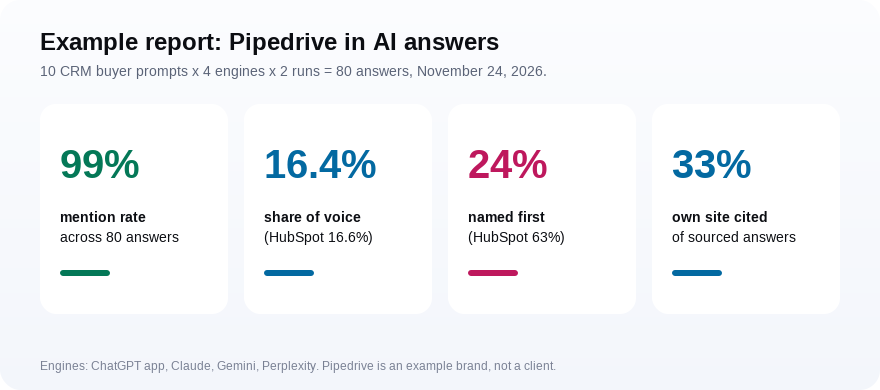
To make the example real, I ran ten CRM buyer prompts on November 24, 2026, twice each on four engines, for 80 answers. The ChatGPT answers came from the ChatGPT app through a scraper, and the other three came from their APIs with web search on. All calls went through DataForSEO and cost $1.45.
I scored the report for Pipedrive, a well-known CRM, because it is a realistic mid-sized brand competing with HubSpot. Pipedrive is not a client and had no part in this.
Disclosure: MentionsAPI sells AI visibility data that teams use to build these reports. I have kept the template tool-neutral, so you can fill it from any source.
What is an AI visibility report?
An AI visibility report is a recurring summary of how AI assistants talk about your brand when buyers ask about your category. It measures whether ChatGPT, Claude, Gemini, Perplexity, and Google's AI features mention you, how prominently, against which competitors, and based on which sources. It pairs that with AI referral traffic. Most teams send it monthly to a client, a CMO, or a founder.
It differs from an audit. Our AI visibility audit guide covers the one-time deep check: crawler access, gaps, and a fix list. The report is the monthly scoreboard that follows it.
Why bother with a report instead of just watching traffic? Because AI answers reduce clicks. A Pew Research Center study found users clicked a result on 8% of Google visits with an AI summary, against 15% without one.
So traffic alone undercounts your presence. A buyer can read your name in an answer and never click.
What metrics should an AI visibility report include?
An AI visibility report should lead with four metrics. Mention rate is the share of answers that name you. Share of voice is your mentions as a share of all brand mentions. Named-first share is how often you are the first brand listed. Own-site citation share is how often the engines cite your domain. Together they cover presence, competition, prominence, and source control.
| Metric | How to calculate it | What it answers |
|---|---|---|
| Mention rate | Answers naming you / all answers | Do AI engines know us? |
| Share of voice | Your mentions / all brand mentions | How much of the conversation is ours? |
| Named-first share | Answers listing you first / all answers | Are we the default pick? |
| Own-site citation | Answers citing your domain / answers with sources | Do engines trust our pages? |
| Average position | Mean rank where you appear | How far down the list are we? |
Named-first share is the one most reports skip, and our example shows why it matters. On mentions alone, Pipedrive looked tied with HubSpot. On who gets named first, it was not close.
Our explainers on AI share of voice and AI visibility scores go deeper on each calculation.
The AI visibility report template
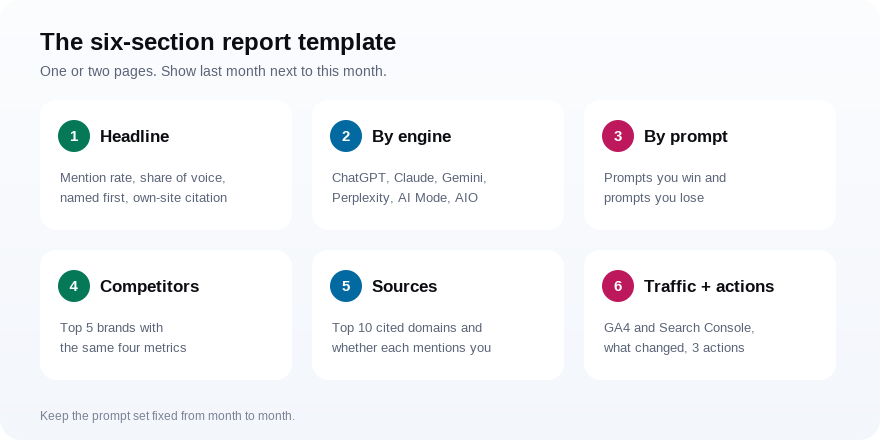
A good AI visibility report template has six sections: a headline with the four core metrics and last month's numbers, a breakdown by engine, a breakdown by prompt, a competitor table, the top cited sources, and a closing section with traffic data and actions. Keep it to one or two pages. Copy the outline below into a doc or spreadsheet and fill it each month.
AI VISIBILITY REPORT: [Brand], [Month YYYY]
Prompt set: [N] buyer prompts x [engines] x [runs] = [total] answers

1. HEADLINE
   Mention rate ......... [x]%   (last month [y]%)
   Share of voice ....... [x]%   (#[rank] in category)
   Named first .......... [x]%   (leader: [competitor], [y]%)
   Own site cited ....... [x]%   of answers with sources

2. BY ENGINE
   ChatGPT | Claude | Gemini | Perplexity | AI Mode | AI Overviews
   mention rate, average position, own-site citation for each

3. BY PROMPT
   Prompts you win (named first), prompts you lose (missing or rank 4+)

4. COMPETITORS
   Top 5 brands: mention rate, share of voice, named-first share

5. SOURCES
   Top 10 cited domains, and whether each one mentions you

6. TRAFFIC AND ACTIONS
   GA4 AI Assistant sessions and conversions
   Search Console AI impressions (AI Overviews, AI Mode)
   What changed, why, and 3 actions for next month
Always show last month next to this month. A single number means little until someone can see which way it is moving.
Keep the prompt set fixed. If you add prompts, report them separately for a month before folding them in, or your trend line will jump for reasons that have nothing to do with the engines.
A real AI visibility report example
In our example, Pipedrive was mentioned in 79 of 80 answers, a 99% mention rate, with a 16.4% share of voice against HubSpot's 16.6%. That looks like a tie. But HubSpot was named first in 63% of answers and Pipedrive in only 24%. HubSpot's average position was 1.75, Pipedrive's 2.35. Pipedrive is always considered, but HubSpot is usually the default pick.
| Brand | Mention rate | Share of voice | Named first | Avg position |
|---|---|---|---|---|
| HubSpot | 100% | 16.6% | 63% | 1.75 |
| Pipedrive | 99% | 16.4% | 24% | 2.35 |
| Zoho CRM | 84% | 13.9% | 3% | 3.61 |
| Salesforce | 56% | 9.3% | 5% | 4.44 |
| monday CRM | 39% | 6.4% | 0% | 5.23 |
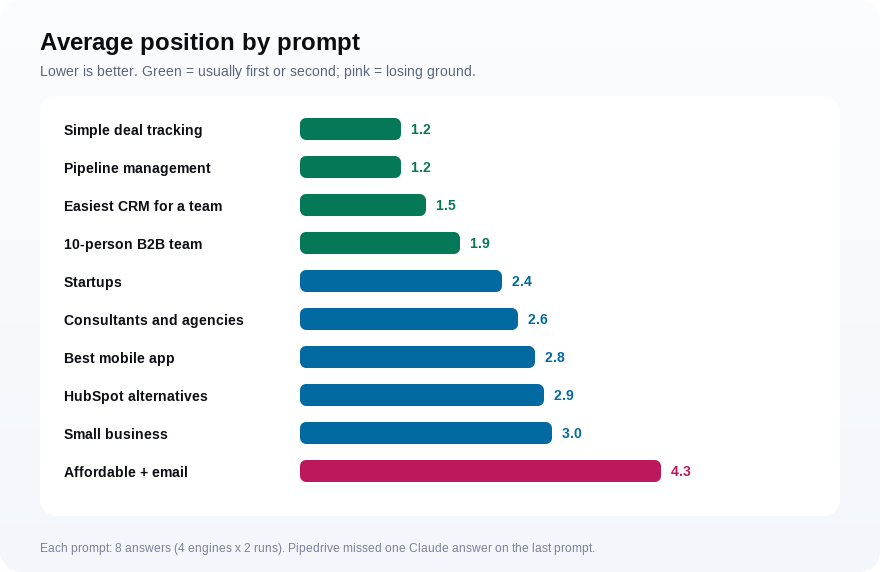
The prompt view shows where Pipedrive wins. It was named first most often on the pipeline management, simple deal tracking, and easiest CRM prompts, with average positions of 1.2, 1.2, and 1.5.
It lost ground on broad prompts. On "best CRM for a small business" it averaged third, and on "best affordable CRM with email integration" it averaged 4.3 and was missing from one Claude answer, its only miss.
One prompt needs a footnote. "Best HubSpot alternatives" named HubSpot first in all eight answers, because the prompt itself names HubSpot. In your own report, leave out named-first scores on prompts that name a competitor.
How do engines differ in an AI visibility report?
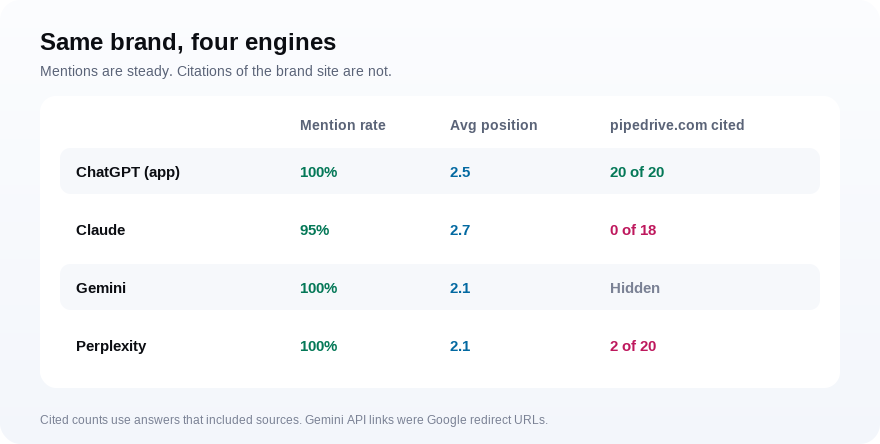
Engines differ most in what they cite, so report each one separately. In our example, Pipedrive's mention rate was 95% to 100% on every engine, but its own site was cited in all 20 ChatGPT app answers, two of 20 Perplexity answers, and none of the 18 Claude answers with sources. One combined citation number would have hidden that split completely.
| Engine | Mention rate | Share of voice | Avg position | pipedrive.com cited |
|---|---|---|---|---|
| ChatGPT (app) | 100% | 17.4% | 2.5 | 20 of 20 |
| Claude | 95% | 13.3% | 2.7 | 0 of 18 |
| Gemini | 100% | 17.5% | 2.1 | Hidden (redirect links) |
| Perplexity | 100% | 18.0% | 2.1 | 2 of 20 |
The "of" figures count answers that included sources. Claude named the most brands per answer, 7.2, which is why Pipedrive's share of voice was lowest there despite a 95% mention rate.
Watch the Gemini numbers. Through the API, Gemini returned sources for only 9 of 20 answers, and every link was a Google redirect URL that hides the real domain. Mark its citation data as unavailable rather than zero.
Which sources belong in the report?
List the ten domains AI engines cite most for your prompt set, and mark whether each one mentions you. Those pages shape the answers, so they are your outreach and content list for next month. In our example, the most cited domains after the vendors themselves were TechRadar at 25% of answers with sources, Fit Small Business at 18%, and TechnologyAdvice at 16%.
Vendor sites took the top spots: pipedrive.com was cited in 33% of answers with sources, hubspot.com in 27%, and zoho.com in 24%. Zoho's Bigin product site added another 19%.
A competitor's blog showed up too. Salesflare's blog was cited in 16% of answers, which is how a smaller CRM gets into answers about bigger ones.
Claude leaned hardest on vendor blogs. Its most cited pages came from Salesflare, OnePageCRM, and NetHunt, all smaller CRMs writing comparison posts about the category.
In all, the answers with sources cited more than 130 different domains. Report the top ten and keep the full list in an appendix.
How do you add AI traffic to the report?
Add two traffic sources to close the report. GA4 now has a native AI Assistant channel that groups visits from assistants such as ChatGPT and Gemini, so report its sessions and conversions. Google Search Console's generative AI performance report shows impressions from AI Overviews and AI Mode. Neither shows competitors, so they support the prompt data without replacing it.
Google announced the Search Console report on June 3, 2026, and its help page says it rolled out to all websites by August 31, 2026. It shows impressions by page, country, device, and date, with no clicks or queries.
GA4 misses some AI visits, because not every assistant passes a referrer. Our guide to tracking AI referral traffic in GA4 shows how to build a wider custom channel.
How often should you run an AI visibility report?
Send the report monthly, but collect data more often, weekly or every two weeks, and average it. AI answers vary between runs, so one snapshot can mislead. In our example, the exact set of brands matched between two runs of the same prompt and engine only 28% of the time. Pipedrive's own presence was steady, agreeing in 39 of 40 run pairs.
That matches SparkToro's research with Gumshoe, which found AI tools rarely return the same list of brands twice. The same research found how often a brand appears is far steadier than its exact rank.
So report rates across many runs. Never screenshot one answer and call it your ranking.
How to turn the report into actions
Every AI visibility report should end with three actions tied to specific numbers in it. Pick the prompts where you are missing or ranked fourth or lower, the engines where your site is never cited, and the third-party pages that rank for your prompts but leave you out. A report without actions becomes a chart people glance at and forget.
For the Pipedrive example, the three actions would look like this:
- Win the broad prompts. Pipedrive averaged fourth on affordable CRMs with email integration, so publish a clear pricing and email-integration comparison page.
- Get cited by Claude. Claude never cited pipedrive.com and leaned on rival vendor blogs, so pitch updates to the comparison posts it cites.
- Close the named-first gap. Track named-first share as the main goal for the quarter, since mention rate is already near 100%.
Next month, the report checks whether each action moved its number.
Pipedrive showed up in 99% of answers. HubSpot still got named first more than twice as often. A mention-only report would have called that a tie.From the Pipedrive example
How to automate your AI visibility report
To automate an AI visibility report, store your prompt set, send it to an AI visibility API on a schedule, save each response, and calculate the four metrics with a script or spreadsheet. Pull GA4 and Search Console data through their own exports. Then spend your time on the part a script cannot do: explaining what changed and choosing next month's actions.
- Save the prompt set and competitor list in one file.
- Schedule runs weekly through an API, two runs per prompt per engine.
- Store brands, positions, and cited URLs from every answer.
- Calculate the four metrics per engine and per prompt.
- Paste the numbers into the template and write three actions.
MentionsAPI returns brands, positions, citations, and search queries for each prompt as JSON. Quick mode asks ChatGPT, Claude, Gemini, and Perplexity through their APIs for 150 credits, and chatgpt_live captures the ChatGPT app for 35. Our guides for n8n and Python show the setup.
Frequently asked questions
What is an AI visibility report?
What metrics should an AI visibility report include?
How often should you report on AI visibility?
How many prompts do you need for an AI visibility report?
Can you get AI visibility data from Google Search Console?
How much does it cost to build an AI visibility report?
Build the first report this week
Write ten buyer prompts for your category, run each twice on four engines, and fill the template with mention rate, share of voice, named-first share, and own-site citations. Then add one number from GA4 and one from Search Console. Next month, run the same prompts and compare.
If you are mentioned everywhere but rarely first, that is your project for the quarter.