GA4 will tell you a confident number for your AI traffic. It is wrong, and it is wrong in a specific, fixable way.
To track AI referral traffic in GA4, use the native AI Assistant channel Google added in May 2026, then build a custom channel group to catch what it misses.
The native channel tags clicks from ChatGPT, Gemini, and a few others automatically. But Perplexity, AI Overviews, and any visit without a referrer slip through.
So default GA4 can miss most of your AI traffic. Here is the full setup, where the gaps are, and why even a perfect configuration still undercounts your real AI reach.
What is GA4's AI Assistant channel?
It is a native channel Google added to GA4 on May 13, 2026 that automatically groups traffic from AI assistants. Qualifying sessions get tagged with Default Channel Group as AI Assistant, medium as ai-assistant, and campaign as ai-assistant, with no configuration from you. Google's documentation lists ChatGPT, Gemini, DeepSeek, Copilot, and Grok as recognized sources, and it works across every property automatically.
This was a real step forward.
Before May 2026, every AI click landed in the generic Referral bucket, mixed with newsletters and partner links, so you could not tell AI traffic apart without manual work. Now, as GA4's documentation confirms, the recognized assistants get their own row with zero setup.
It costs you nothing to start reading it.
Because the channel is automatic and property-wide, you already have some AI data in your reports right now, filed under AI Assistant. Open any traffic acquisition report, find the AI Assistant row, and you have a baseline before you touch a setting. The custom work later is about widening that view, not building it from nothing.
The problem is what counts as recognized.
The native channel only catches the specific assistants Google lists, arriving with a referrer it recognizes. That turns out to be a minority of real AI traffic, which is where the manual work still comes in.
GA4's AI Assistant channel shows you the AI traffic Google can see. The gap between that and your real AI traffic is the whole problem.The one line to remember
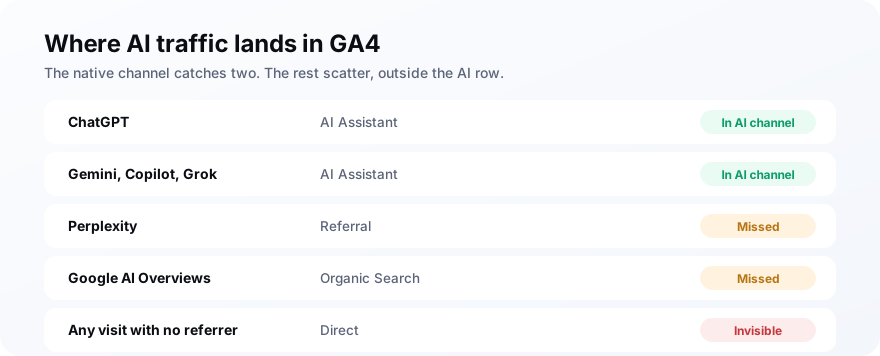
Where does AI traffic actually land in GA4?
Not all of it lands where you would expect. ChatGPT and Gemini clicks now land in the AI Assistant channel, but Perplexity still shows up under Referral, AI Overviews count as Organic Search, and any AI visit that arrives without a referrer falls into Direct. By one estimate, stopping at the default setup leaves up to 70% of your real AI traffic uncounted or misfiled.
| AI source | Where it lands by default | In the AI channel? |
|---|---|---|
| ChatGPT (with referrer) | AI Assistant | Yes |
| Gemini, Copilot, Grok | AI Assistant | Yes |
| Perplexity | Referral | No |
| Google AI Overviews | Organic Search | No |
| Any visit with no referrer | Direct | No |
The Direct bucket is the biggest leak.
Mobile apps, in-app browsers, and copy-paste navigation all strip the referring URL, so GA4 has no source to read and files the session under Direct. A huge share of AI traffic arrives exactly this way, which means it is invisible as AI traffic no matter how you configure your channels.
Add the leaks up and the default view is badly incomplete.
Between Perplexity in Referral, AI Overviews in Organic, and the rest in Direct, agency teardowns of the new channel find it surfaces well under half of real AI-driven visits. The native channel is a floor to build on, not the finished answer.
How do you build a custom AI channel group?
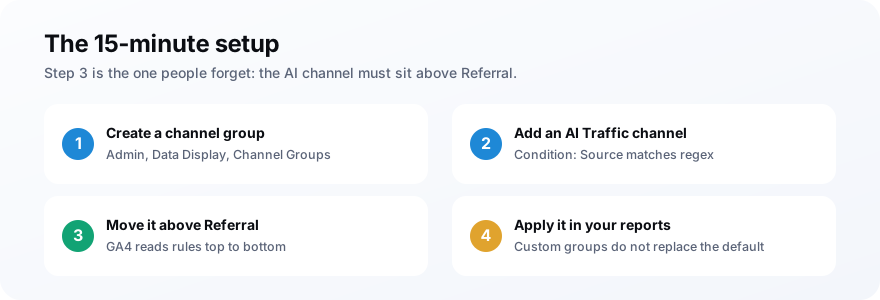
Create a custom channel group in GA4 admin, add an AI channel defined by a regex of AI source domains, and move it above Referral so it catches those sessions first. It takes about fifteen minutes and surfaces AI traffic as its own row, including Perplexity and the assistants the native channel skips. The step people miss is the ordering.
Here is the full setup, in order:
- Go to Admin, then Data Display, then Channel Groups, and create a new group named something like "Default plus AI Traffic."
- Add a channel called "AI Traffic" with the condition Source matches regex.
- Paste a regex that matches the AI source domains you care about.
- Drag the AI Traffic channel above Referral, since GA4 reads rules top to bottom and Referral would otherwise catch the clicks first.
- Select your new channel group in each report and Exploration where you want AI traffic visible, since custom groups do not replace the default automatically.
Use a specific regex, like this one:
Keep it tight on purpose.
A lazy shortcut like matching .ai will also catch mail domains, country domains, and half the internet, which pollutes your AI channel with traffic that has nothing to do with AI. Match full domains with escaped dots, and add new assistants to the pattern as they matter to you.
Verify it the next day, once data flows.
Check the AI Traffic channel against a manual source report for the same dates. If they disagree, the regex is usually the culprit, a missing escape or an engine you forgot, or the channel is still sitting below Referral. Catch that before anyone builds a report on the numbers.
One thing you cannot do is tag the links yourself.
With ads or newsletters you add UTM parameters to control attribution, but you do not own the links inside an AI answer, so UTMs are not an option here. Source-based detection through the channel group is the only lever you have, which is exactly why the regex and the ordering have to be right.
How do you spot-check AI referrals without a channel group?
Open an Exploration, break traffic down by session source, and filter for the AI domains. You can see AI referrals in minutes without changing any settings, which is enough for a quick look or a one-off audit. The channel group is better for ongoing tracking, but a filtered source report answers how many people clicked through from AI today.
This is the fastest way to sanity-check the channel group, too.
Run the filtered source view and the AI channel side by side. If the numbers are miles apart, your regex is probably wrong or ordered below Referral, and you can fix it before anyone reports off bad data. Our guide on AI search analytics covers where referral traffic fits among the metrics that matter.
How do you measure conversions from AI traffic?
Once AI traffic has its own channel, compare its conversion rate to your other channels, because AI referrals tend to convert well. The visitor arrived already recommended by the AI, so they are further along than a cold search click. In GA4, bring your key conversion events into an Exploration and segment by the AI channel to see it.
The pattern most teams find is small but mighty.
AI referral volume is low, yet the sessions it sends often convert above average, because the buyer was pre-sold by the answer. That makes conversion rate, not raw sessions, the number worth watching for AI traffic. A channel with 200 visits converting at 6% can matter more than one with 2,000 visits at 1%.
Set it up as a comparison, not a vanity row.
Build an Exploration that puts AI traffic next to Organic and Direct on sessions, conversion rate, and revenue per session, as setup guides like ThemeIsle's lay out. That framing turns a small AI number into a fair fight, and it is how you justify the effort before the volume catches up.
Watch the slope over a quarter.
AI referral volume is still climbing for most sites, so the slope over a quarter tells you more than any single month. Chart it over time and you will usually watch the channel grow from a rounding error into a line that earns its place in the report.
What are the common GA4 AI tracking mistakes?
Most broken setups fail the same few ways. Each one leaves you confidently reading a number that is wrong.
- AI channel below Referral: the most common error. GA4 reads top to bottom, so Referral eats the clicks before your AI channel fires.
- A too-broad regex: matching
.aior bare words sweeps in unrelated domains and inflates the channel. - Reading the default group: custom channel groups do not replace the default, so you have to select yours in each report.
- Treating Direct as non-AI: a chunk of your Direct bucket is really referrer-less AI traffic you will never fully separate.
- Judging AI on sessions: the volume is low by nature, so conversion rate is the fairer measure.
Why does GA4 still undercount your AI visibility?
Because a click is the smallest part of AI influence. Most AI answers never produce a click at all, and when they do, the referrer is often stripped. GA4 can only show the visits that happened, not the far larger number of times an AI named you to a buyer who never clicked. Referral traffic is the tip of the iceberg, not the iceberg.
This is the trap of measuring AI by GA4 alone.
In a world where most searches end without a click, as our guide on zero-click search lays out, a low AI referral number can mean you are winning, not losing. The AI answered the question, named you, and the buyer moved on already sold. No click, but real influence.
Picture the shape of it.
For every buyer who clicks through from ChatGPT and lands in GA4, there may be ten who read the answer, saw your name, and searched for you directly a week later. GA4 logs the one click and misses the ten impressions, which is why referral traffic is a floor on your AI influence rather than the ceiling.
So track referrals, but do not stop there.
Set up GA4 properly to see the clicks you can see, then measure what it cannot: whether AI engines actually mention and cite you for the questions your buyers ask. That is a different measurement entirely, and it is the one that captures the reach GA4 structurally misses.
Frequently asked questions
How do you track AI referral traffic in GA4?
Does GA4 track ChatGPT traffic automatically?
Why does AI traffic show up as direct in GA4?
What regex should I use for AI traffic in GA4?
Does GA4 track AI Overviews traffic?
Why is my AI referral traffic so low in GA4?
Set it up, then measure what GA4 cannot see
Do this next: spend fifteen minutes building the custom AI channel group, put it above Referral, and apply it to the reports you actually read. That alone moves you from a misleading default view to a real one.
Then close the gap GA4 leaves open. Pair your referral tracking with MentionsAPI to see whether AI engines name and cite you, clicks or no clicks, and you will finally be measuring your whole AI presence instead of the sliver that happens to show up as a visit.