Every AI visibility dashboard runs the same loop: ask, parse, store, compare. You can write that loop yourself in an afternoon.
To track AI brand mentions with Python, write a script that sends your buyer prompts to the AI engines, records whether each answer mentions your brand, ranks it, and cites your domain, and saves every run to SQLite. Schedule it weekly with GitHub Actions and compare each run with the last, so a Slack alert fires only when fewer engines name you.
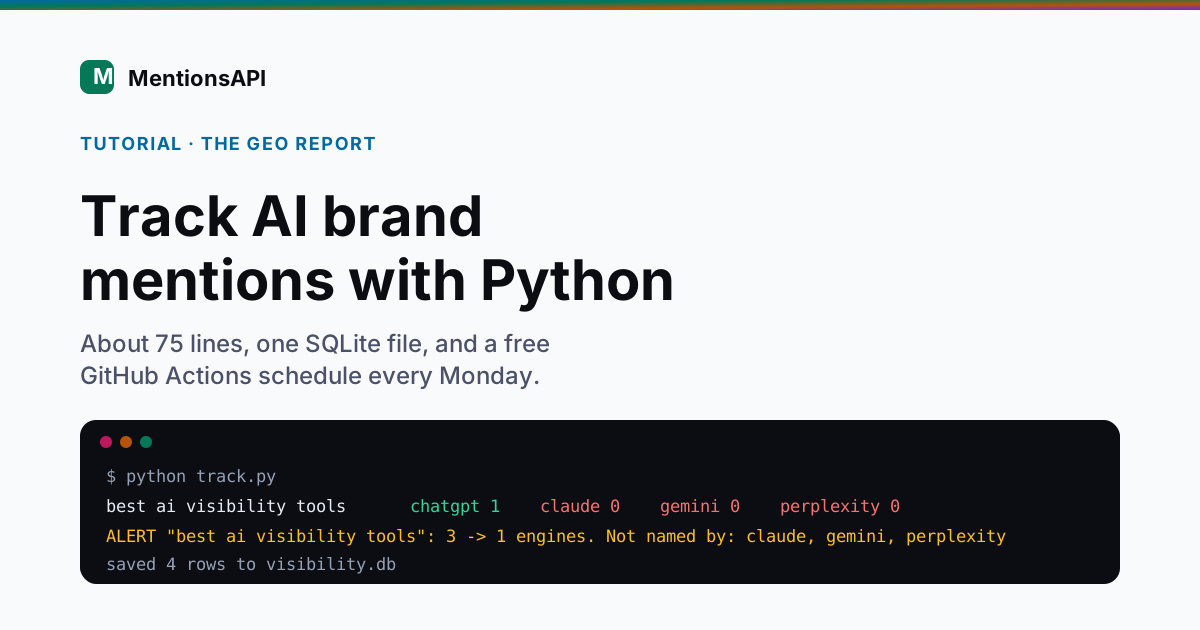
I have built this tracker in n8n, Make, and Zapier. The Python version is the one I would keep, because it costs nothing to schedule and the history never leaves your repository.
It is also the obvious choice for a lot of teams now. Python was used by 57.9% of developers in the 2025 Stack Overflow Developer Survey, a seven-point jump in a single year.
What does a Python AI brand mention tracker do?
A Python AI brand mention tracker asks the AI engines the questions your buyers ask, checks each answer for your brand, and keeps score over time. It has five parts: a prompt list, an API call, a scoring function, a SQLite history, and an alert. A scheduler runs it weekly, because any single answer is close to random and the trend is what means something.
| Part | What it does | Built with |
|---|---|---|
| Prompt list | Holds the buyer questions to test | prompts.txt |
| API call | Asks the engines each prompt | requests |
| Scoring | Mention, rank, citation per engine | Plain Python |
| History | One dated row per prompt and engine | sqlite3 (standard library) |
| Alert | Flags a drop versus the last run | Slack incoming webhook |
| Scheduler | Runs it every Monday | GitHub Actions |
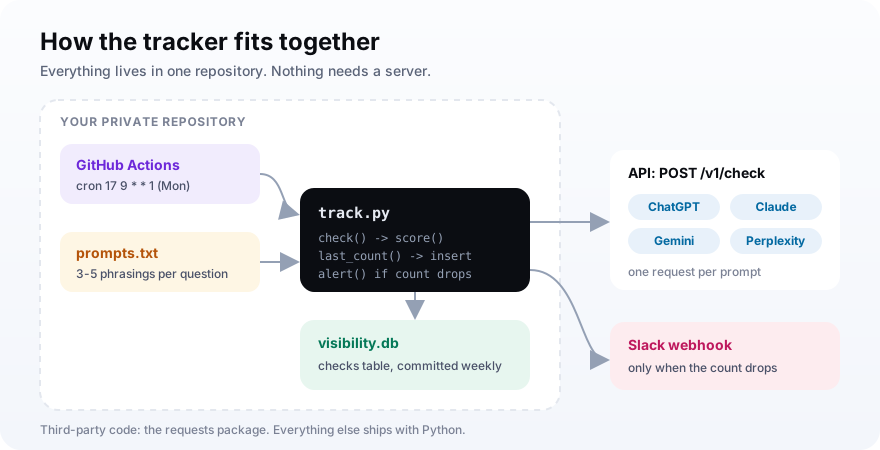
Requests is the one third-party package. Everything else, including the database, ships with Python.
What you need before you start
You need Python 3.10 or newer, a GitHub repository, an API key for the AI data, and optionally a Slack incoming webhook URL. Nothing here needs a server. The script runs on your laptop for testing and on a GitHub-hosted runner once it is scheduled, so your running cost is the API calls themselves.
- Python 3.10+ and the requests package installed with pip.
- A private GitHub repository to hold the script, the prompts, and the database file.
- An AI data source: an AI-visibility API key that covers several engines, or your own OpenAI and Perplexity keys.
- A Slack incoming webhook URL, if you want alerts in a channel.
- Your brand name and your domain.
Keep keys out of the code. The script reads them from environment variables, which become repository secrets later.
Step 1: Write a prompt list worth tracking
Put your buyer prompts in a plain prompts.txt file, one per line, and write three to five phrasings of each buying question instead of one. Real buyers word the same question very differently, and repeating one exact string can hand back a cached answer when you wanted a new sample. Leave your brand name out, or you are testing whether a model can describe a company you named.
The phrasing point is backed by data. In a SparkToro and Gumshoe study, 142 people wrote their own prompts for the same headphone question and the prompts barely overlapped, with a semantic similarity score of 0.081, Search Engine Journal reported.
The file stays simple. Lines starting with # are comments:
# category: ai visibility tools
best ai visibility tools
which tool tracks if chatgpt recommends my brand
ai brand monitoring software for a small saas team
# comparison
alternatives to profound for ai visibility
Our guide to prompt monitoring covers which questions map to real buying decisions.
Step 2: Call the engines with requests
Write a check function that POSTs one prompt and returns the parsed JSON. With an AI-visibility API that is a single request covering ChatGPT, Claude, Gemini, and Perplexity. Add a timeout, call raise_for_status so failures are loud, and retry on HTTP 429 with a growing pause, because a weekly job should survive one rate-limited minute.
Here is the top of the script, with the settings and the prompt loader:
import datetime as dt
import os
import sqlite3
import time

import requests

API_URL = "https://api.mentionsapi.com/v1/check"
API_KEY = os.environ["MENTIONSAPI_KEY"]
SLACK_URL = os.environ.get("SLACK_WEBHOOK_URL")
BRAND = "YourBrand"
DOMAIN = "yourbrand.com"
ENGINES = ["chatgpt", "claude", "gemini", "perplexity"]


def load_prompts(path="prompts.txt"):
    with open(path, encoding="utf-8") as f:
        return [line.strip() for line in f if line.strip() and not line.startswith("#")]
And the call itself:
def check(prompt):
    for attempt in range(3):
        r = requests.post(
            API_URL,
            headers={"Authorization": f"Bearer {API_KEY}"},
            json={"mode": "quick", "query": prompt, "brand": BRAND},
            timeout=120,
        )
        if r.status_code == 429:
            time.sleep(10 * (attempt + 1))
            continue
        r.raise_for_status()
        return r.json()
    raise RuntimeError(f"Still rate limited after 3 tries: {prompt}")
One engine failing does not sink the call. MentionsAPI returns the engines that answered plus an errors array for the ones that did not, and only charges for the engines that came back.
That is why the scorer in Step 3 treats a missing provider as an empty result. A bad week for one engine shows up as a zero row instead of a crashed job.
If you would rather go direct, OpenAI's Responses API has a web search tool. Citations come back as url_citation annotations with the URL and title, per OpenAI's web search guide:
from openai import OpenAI

client = OpenAI()
resp = client.responses.create(
    model="gpt-5.5",
    tools=[{"type": "web_search"}],
    input=prompt,
)
mentioned = BRAND.lower() in resp.output_text.lower()
cited = any(
    DOMAIN in a.url
    for item in resp.output if item.type == "message"
    for part in item.content
    for a in (part.annotations or []) if a.type == "url_citation"
)
That works for one engine. The catch is upkeep, because every engine API has its own shape and they change under you.
Even within 2026, OpenAI scheduled o4-mini, one of the models its search guide lists, for shutdown on October 23, and Perplexity now documents /v1/sonar as its main Sonar endpoint, with the old chat completions path kept as an alias. Four direct integrations means four of those to track.
| Approach | Code you maintain | Best for |
|---|---|---|
| OpenAI web search only | One client, annotation parsing | A ChatGPT-only check |
| Each engine API directly | Four clients, four response shapes | Teams that want raw control |
| One AI-visibility API | One POST, normalized fields | Four engines with little upkeep |
Step 3: Score mention, rank, and citation
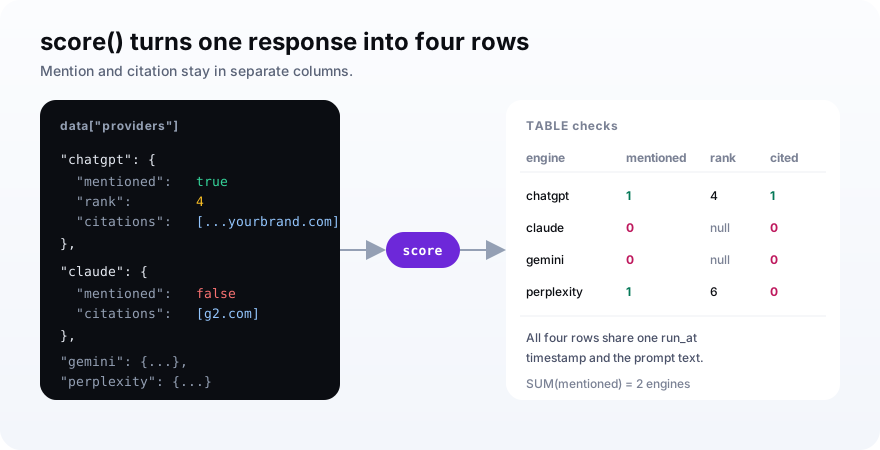
Turn each response into one row per engine with three values: whether your brand was mentioned, the rank it appeared at, and whether your domain shows up in the citation URLs. Store mention and citation separately. A mention means the engine said your name, while a citation means it linked to your site as a source, which is rarer and the one that can send a click.
def score(data):
    rows = []
    for engine in ENGINES:
        p = data["providers"].get(engine) or {}
        urls = [c.get("url", "") for c in p.get("citations") or []]
        mentioned = int(bool(p.get("mentioned")))
        cited = int(any(DOMAIN in u for u in urls))
        rows.append((engine, mentioned, p.get("rank"), cited))
    return rows
The engine loop guards against a missing provider with an empty dict, so one engine failing never crashes the run.
Why bother with the citation column at all? Because clicks from AI answers are rare.
When Google shows an AI summary, users click a source inside it on only 1% of visits, according to Pew Research Center. Your analytics barely sees AI, so this table has to.
Step 4: Save every run to SQLite
Store each result in a SQLite table called checks, with one row per prompt and engine and a UTC timestamp for the run. SQLite ships with Python, needs no server, and keeps the whole history in one file you can commit to the repository. A last_count helper reads how many engines named your brand on the previous run, which is what the alert compares against.
def connect(path="visibility.db"):
    db = sqlite3.connect(path)
    db.execute(
        """CREATE TABLE IF NOT EXISTS checks (
             run_at TEXT, prompt TEXT, engine TEXT,
             mentioned INTEGER, rank INTEGER, cited INTEGER)"""
    )
    return db


def last_count(db, prompt):
    row = db.execute(
        """SELECT SUM(mentioned) FROM checks
           WHERE prompt = ? AND run_at = (
             SELECT MAX(run_at) FROM checks WHERE prompt = ?)""",
        (prompt, prompt),
    ).fetchone()
    return row[0]
Read the previous count before you insert the new rows. Do it the other way round and you compare today with today.
The file stays tiny. Fifteen prompts across four engines every Monday is 3,120 rows a year, which is why committing it to the repository is fine and you never need a hosted database.
Step 5: Alert Slack when visibility drops
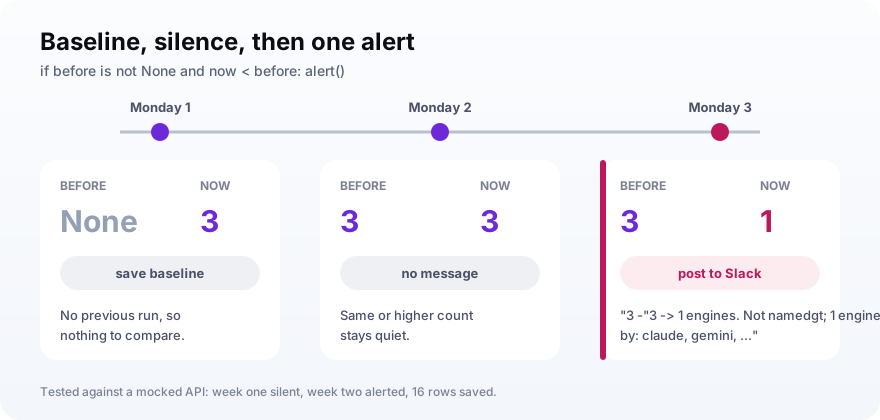
Count how many engines named your brand this run, compare it with the previous run, and post to a Slack incoming webhook only when the number falls. The first run sets a baseline and sends nothing. A steady or rising count stays quiet. That keeps the channel worth reading, because each message means something changed for the worse.
def alert(prompt, before, now, rows):
    missing = [engine for engine, mentioned, _, _ in rows if not mentioned]
    text = f'"{prompt}": {before} -> {now} engines. Not named by: {", ".join(missing)}'
    print("ALERT", text)
    if SLACK_URL:
        requests.post(SLACK_URL, json={"text": text}, timeout=30)


def main():
    run_at = dt.datetime.now(dt.timezone.utc).isoformat(timespec="seconds")
    db = connect()
    for prompt in load_prompts():
        rows = score(check(prompt))
        before = last_count(db, prompt)
        db.executemany(
            "INSERT INTO checks VALUES (?, ?, ?, ?, ?, ?)",
            [(run_at, prompt, *row) for row in rows],
        )
        db.commit()
        now = sum(row[1] for row in rows)
        if before is not None and now < before:
            alert(prompt, before, now, rows)
        time.sleep(6)  # stays under 10 requests a minute


if __name__ == "__main__":
    main()
I tested this against a mocked API: week one logged three engines and stayed silent, week two dropped to one and printed the alert, and the table held 16 rows for two prompts over two runs.
The six-second sleep at the end of the loop keeps the script under a 10-requests-a-minute rate limit, which is what the MentionsAPI free plan allows.
The baseline run should be silent. If your first Monday floods Slack, the alert logic is wrong, and nobody will trust the second Monday.The alert rule
Step 6: Schedule it free with GitHub Actions
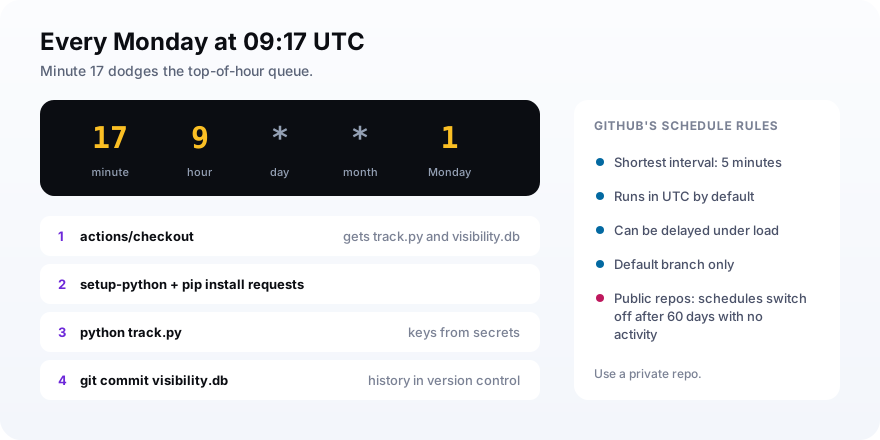
Add a workflow file with a schedule trigger, a weekly cron expression, your keys as repository secrets, and a final step that commits visibility.db back to the repository. GitHub runs it on a hosted runner, so there is no server to keep alive, and committing the database keeps your full history in version control next to the script.
name: ai-visibility
on:
  schedule:
    - cron: "17 9 * * 1"
  workflow_dispatch:
permissions:
  contents: write
jobs:
  track:
    runs-on: ubuntu-latest
    steps:
      - uses: actions/checkout@v4
      - uses: actions/setup-python@v5
        with:
          python-version: "3.12"
      - run: pip install requests
      - run: python track.py
        env:
          MENTIONSAPI_KEY: ${{ secrets.MENTIONSAPI_KEY }}
          SLACK_WEBHOOK_URL: ${{ secrets.SLACK_WEBHOOK_URL }}
      - name: Save history
        run: |
          git config user.name "visibility-bot"
          git config user.email "[email protected]"
          git add visibility.db
          git commit -m "Weekly AI visibility run" || echo "No changes"
          git push
A few rules from GitHub's schedule documentation shape this file. Schedules run in UTC, can be delayed during busy periods, and only fire on the default branch.
That is why the cron uses minute 17 instead of the top of the hour, when queues are worst. The workflow_dispatch line adds a Run button for testing.
Add the two secrets under Settings, then Secrets and variables, then Actions, using the exact names the workflow reads: MENTIONSAPI_KEY and SLACK_WEBHOOK_URL. Then press Run workflow once and check that visibility.db appears in the next commit.
What does it cost to run a Python AI mention tracker?
A weekly Python AI mention tracker costs close to nothing to run apart from the AI calls. The GitHub-hosted job finishes in about a minute, which barely touches the Actions minutes on any plan. The real cost is the data: on MentionsAPI a fresh quick check across four engines is 150 credits, and a recently asked query costs 5.
| Piece | Cost | Note |
|---|---|---|
| Python, requests, SQLite | Free | Open source and standard library |
| GitHub Actions schedule | Free for a weekly job | About a minute of runner time per run |
| Slack incoming webhook | Free | One message per drop |
| AI data | Per check | Engine API tokens and search fees, or visibility API credits |
Compare that with the no-code builds. The same tracker on Zapier needs a paid plan for the webhook step, and on Make each module action draws credits.
Python script or a no-code tool?
Pick Python if someone on your team writes code and you want free scheduling, full control, and history in a file you own. Pick Zapier, Make, or n8n if the tracker will be run by marketing or ops people who do not code. The logic is identical in all four: ask, score, store, compare, alert. Only the billing and the maintenance change.
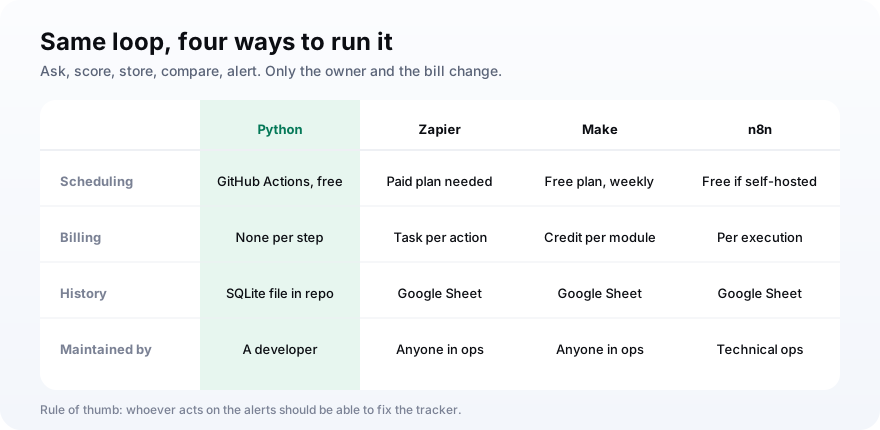
My rule of thumb: whoever acts on the alerts should be able to fix the tracker. If that is a developer, write the script.
How to read your AI mention data
Read the data as a weekly mention rate and citation rate per engine, not as individual answers. One SQL query over the checks table gives both numbers by day and engine. Watch the line move over four or more weeks, because a single run is noisy: the SparkToro study found less than a 1-in-100 chance of an AI tool repeating the same brand list.
SELECT substr(run_at, 1, 10) AS day, engine,
       ROUND(AVG(mentioned) * 100) AS mention_rate,
       ROUND(AVG(cited) * 100) AS citation_rate
FROM checks
GROUP BY day, engine
ORDER BY day, engine;
Frequency is the steadier signal. In the same study, Bose, Sony, Sennheiser, and Apple each appeared in 55% to 77% of 994 headphone answers, even while the order kept changing.
Want the same numbers for a competitor? Add a brand column to the table, loop over a short list of brand names inside main, and the query groups by brand as well. Your rate next to theirs is the number leadership actually asks about.
When a prompt keeps losing, fix the page that should win it. The Princeton GEO study found that adding statistics and cited sources raised visibility in AI answers by 30% to 40%. Our share of model guide shows how to turn the same table into a competitive number.
Mistakes that make a Python tracker wrong
Most broken trackers run without errors and still produce misleading numbers. The bugs live in ordering, sampling, and scheduling. The API call is rarely the problem. These are the ones I would check first in any version of this script, including mine.
- Reading last_count after inserting the new rows, so every run compares with itself.
- Repeating one identical prompt for samples and getting the cached answer back.
- Putting your brand in the prompts, which inflates the mention rate.
- Hardcoding API keys instead of reading them from environment variables and secrets.
- Scheduling at minute zero, when GitHub queues are longest and runs start late.
- Leaving the repository public and losing the schedule after 60 quiet days.
- Alerting on the first run, before there is a baseline to compare with.
Frequently asked questions
How do I track if ChatGPT mentions my brand with Python?
How do I get citations from the OpenAI API in Python?
How do I run a Python script on a schedule for free?
How many times should I run each prompt?
Is the API answer the same as what users see in the ChatGPT app?
Should I use Python or a no-code tool like Zapier or Make?
Ship the script, then let four Mondays pass
To track AI brand mentions with Python this week: write fifteen prompt variants, paste in the script, run it once locally, push it to a private repository, and add the two secrets. Then leave it alone for four Mondays. A month of rows is your baseline, and from then on every Slack message is a real change.
When the baseline shows gaps, add engines and prompts and leave the script alone. If you want the call to stay a single request however many engines you track, point it at an AI-visibility API like MentionsAPI.