The question is not whether AI engines are describing your market to buyers. They are. The question is whether you find out what they say before your pipeline does.
Checking AI answers by hand is a losing game. You open ChatGPT, type a prompt, read the answer, open Perplexity, repeat, and by the time you have covered five prompts across four engines the morning is gone and the answers have already shifted.
So you stop checking. Then a competitor quietly becomes the name every AI recommends in your category, and you notice months later when the deals dry up.
n8n fixes the scale problem. It is an open workflow automation tool, and it has every node you need to turn that manual routine into something that runs on a timer and tells you when the answer changes. Here is how to build it, node by node.
What you are building
You are building a scheduled n8n workflow that asks the AI engines your most important buyer questions, records whether they name and cite your brand, and alerts you when they name a competitor instead. It runs daily or weekly without supervision, writes every result to a spreadsheet you can chart, and turns a vague worry about AI visibility into a dated log you can act on. Think of it as a crawler for the answers your buyers actually read.
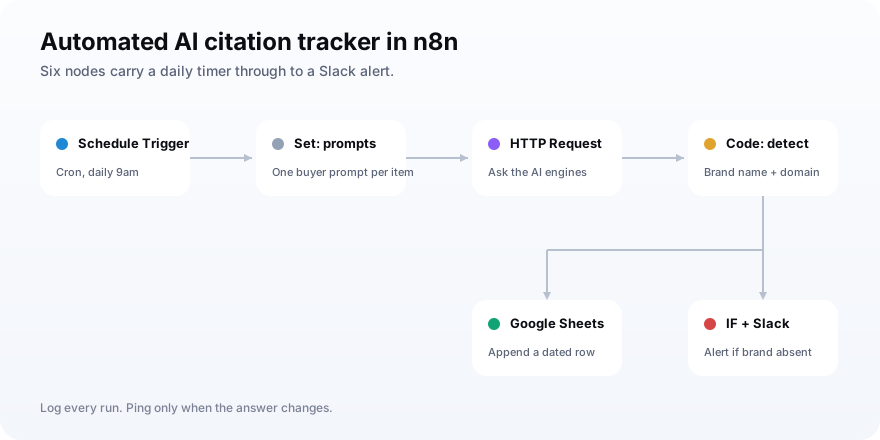
The finished workflow is a short chain of nodes:
| Node | Its job | Key setting |
|---|---|---|
| Schedule Trigger | Start the run on a cadence | Cron, daily at a fixed hour |
| Set (Edit Fields) | Hold your list of buyer prompts | One item per prompt |
| HTTP Request | Ask each engine the prompt | POST, header auth, JSON body |
| Code | Detect brand name and domain | A few lines of JavaScript |
| Google Sheets | Log every result with a date | Append row |
| IF plus Slack | Alert when a rival wins | Branch on mentioned = false |
Why bother automating it at all? Because the surface your buyers research on is moving, and it is moving fast.
ChatGPT referrals to news sites grew from just under one million visits across January to May 2024 to more than twenty-five million in 2025, a twenty-five-fold jump, Similarweb data reported by TechCrunch shows. The answers these engines give are becoming a real channel, and an unmeasured one.
What you need before you start
Before you build, line up a handful of accounts and keys so the workflow has everything it reaches for. None of this is exotic, and most teams already have half of it. Gather these first and the build itself takes about an hour.
- An n8n instance: either n8n Cloud or a self-hosted install. Both run this workflow identically.
- Your buyer prompts: five to fifteen real questions a prospect would ask an AI about your category, such as best tools for X or alternatives to Y.
- An AI data source: either API keys for the engines you want (OpenAI, Perplexity) or a key for an AI-visibility API that covers several engines in one call.
- A Google account: for the Sheet that stores results, connected to n8n with a Google Sheets OAuth credential.
- A Slack workspace: with a bot token or OAuth credential, plus a channel for the alerts.
- Your brand facts: your exact brand name, any common variations, and your domain, so the detector knows what to look for.
One note on the prompts, because they decide whether the whole thing is worth running.
Keep them neutral and buyer-shaped. Ask what a prospect would ask, not a question with your name baked in, since a prompt like best project tools tests real discoverability while is MyBrand good just tells you the model can describe a company you named. Our guide on prompt monitoring covers how to choose and group prompts that map to actual buying decisions.
Step 1: Add a Schedule Trigger
Start the workflow with a Schedule Trigger, the node that fires your run on a fixed cadence instead of waiting for a manual click. Add it as the first node, set the mode to Cron, and give it an expression like 0 9 * * * to run every day at 9am, or 0 9 * * 1 for every Monday at 9am. That one node is the difference between a tracker you remember to run and one that just runs.
Daily is a good default, and there is a reason not to go faster.
Every run sends real prompts to paid APIs, so a check every few minutes burns tokens for almost no new signal, because AI answers change over days, not seconds. The n8n Schedule Trigger docs cover interval mode too if you prefer a simple every-N-hours setup over cron syntax.
Step 2: Define your buyer prompts
Next, give the workflow the list of prompts to test using a Set node, renamed Edit Fields in newer n8n versions. The cleanest pattern is one prompt per item, because n8n runs the nodes that follow once for every item it receives, so a list of ten prompts means ten automatic checks with no loop to wire up. Paste your prompts in here and the rest of the workflow fans out across them for free.
You have two ways to produce those items.
The quick way is a Code node that returns an array, one object per prompt, like { prompt: 'best ai visibility tools' }. The tidier way for a team is to keep the prompts in a Google Sheet and read them with a Google Sheets node, so a colleague can edit the list without touching the workflow. Either way, each prompt arrives downstream as its own item.
Keep the list tight at first. Five to fifteen prompts that map to real buying moments beats fifty vague ones, and a smaller set keeps your token bill and your Slack noise sane while you tune the thing.
Step 3: Query the AI engines with the HTTP Request node
Now send each prompt to an AI engine using the HTTP Request node, n8n's general-purpose connector for any REST API. Set the method to POST, point the URL at the engine's completions endpoint, add your key with Header Auth, and build a JSON body that drops your prompt into the messages field. Because this node also runs once per item, every prompt from Step 2 gets sent automatically.
For a web-grounded answer from OpenAI, you would POST to its chat completions endpoint with a search-enabled model rather than scraping the ChatGPT app, which is more stable and stays inside the terms of service. For Perplexity, you add a second HTTP Request node with that API's key and body. The n8n HTTP Request docs walk through auth and body setup in detail.
This is the step where doing it yourself starts to hurt, and it is worth seeing why before you commit.
One engine is easy. Four is four sets of credentials, four request shapes, and four different ways of returning source links, all of which you then have to normalize in the next node. That is the tradeoff at the heart of this build, so it gets its own table below.
| Approach | Good for | The cost |
|---|---|---|
| Call each engine directly | One or two engines, tight budgets | Separate auth and parsing per engine |
| Use an AI-visibility API | ChatGPT, Claude, Gemini, Perplexity together | A per-check fee, one simple call |
| Scrape the chat apps | Nothing, really | Fragile, and against the terms of service |
If you want all four engines, a single HTTP Request node to an AI-visibility API keeps the workflow small. You POST one prompt plus your brand, and the API returns a normalized result for every engine, so you skip four integrations and four parsers. MentionsAPI is one such option, built for exactly this call, and it is the example used in the alert step below.
Tracking more than one engine is not fussiness, it is the whole point.
The engine mix is shifting under everyone. From September to November 2025, ChatGPT referrals grew fifty-two percent year over year while Gemini referrals grew three hundred eighty-eight percent in the same window, per Similarweb figures compiled by Digiday. Track one engine and you are blind to the one your buyers are moving to.
Even the leader's grip is loosening, which is the same argument from another angle. SE Ranking put ChatGPT's worldwide share of all AI referral traffic at about eighty percent and sliding as rivals catch up. A tracker that only watches ChatGPT is already measuring a shrinking slice.
Step 4: Detect your brand in the response
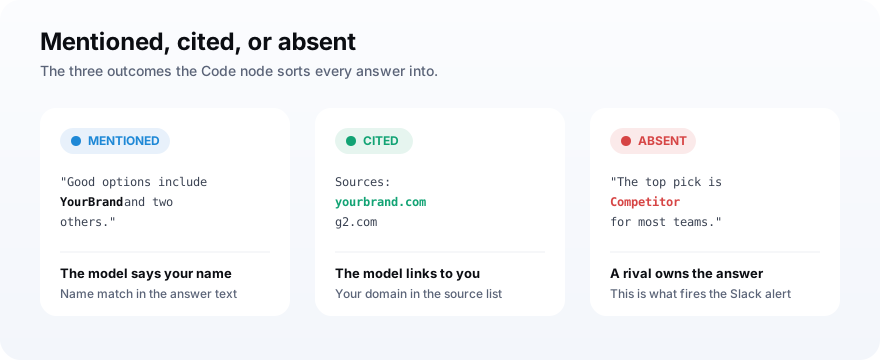
With the answer in hand, add a Code node to decide whether your brand actually appeared and whether it was cited. The starter version lowercases the response text, checks whether your brand name is in it, and scans the source links for your domain, which separates a passing mention from a real citation with a link. It outputs a few clean fields the logging step can write straight to a spreadsheet.
The logic is short enough to read in one sitting:
const brand = 'mybrand';
const domain = 'mybrand.com';
const answer = ($json.text || '').toLowerCase();
const sources = $json.sources || [];

const mentioned = answer.includes(brand);
const cited = sources.some(s => (s.url || '').includes(domain));

return [{ json: {
  prompt: $json.prompt,
  engine: $json.engine,
  mentioned,
  cited,
  checked_at: new Date().toISOString(),
} }];
A plain string match handles most brands, but it has a known blind spot.
If your brand name is also a common word, the match will fire on sentences that have nothing to do with you, and you will log false positives. When that happens, swap the includes check for a small classification step that asks a model to label the answer mentioned, cited, or absent, which reads the meaning instead of the letters. Our walkthrough on checking if ChatGPT mentions your brand goes deeper on reliable detection.
This split between mentioned and cited matters more than it looks.
A mention is the model saying your name. A citation is the model linking to you as a source, which carries more weight and sends the occasional click. Logging both as separate columns lets you see whether you are being talked about, trusted as a source, or both.
Step 5: Log every result to Google Sheets
Send each checked result to a Google Sheets node so you build a dated history instead of a disposable snapshot. Use the Append operation, connect your Google Sheets OAuth credential, pick the spreadsheet and tab, and map the fields from the Code node into columns like date, prompt, engine, mentioned, and cited. Every run adds rows, and over weeks those rows become a trend line you can actually chart.
The history is the part that pays off later.
One check tells you today's answer. A month of daily checks tells you whether your visibility is climbing, flat, or sliding, and roughly when a change started, which is the difference between a number and a trend. A spreadsheet is the cheapest version of that; a dedicated AI visibility score is the same idea with the math built in.
Keep the columns boring and consistent. A stable schema means you can drop a pivot or a chart on top later without rescuing data from a format you changed halfway through.
Step 6: Alert Slack when a competitor wins
Finally, add an IF node followed by a Slack node so a missed answer reaches you instead of waiting in a spreadsheet. Point the IF at the mentioned field and branch on false, then wire the false branch into a Slack node set to post to your channel with the prompt and engine that came back empty. Now the workflow records the problem and taps you on the shoulder about it the same day.
The alert is what turns this from a report into a system.
Nobody opens the dashboard every morning, so a log alone quietly goes stale. A Slack message that says you were absent from Perplexity for best tools in your category today lands while you can still do something about it. You can widen the rule to fire when a named competitor appears, which is the earliest warning you will get.
To stop repeat pings, borrow a pattern teams use for Sheets-to-Slack flows.
Keep a column that marks whether a given prompt and engine already triggered an alert, and only notify when today's result flips from present to absent, so you hear about the change, not the same ongoing gap every single day. For tracking rivals specifically, our guide on monitoring competitor AI visibility covers what to watch and when a change is worth an alert.
A spreadsheet tells you what the AI said. A Slack alert tells you the moment it changed. Only one of those saves the deal you did not know was slipping.The reason to automate it
How to read the data once it is running
Once a week or two of runs have piled up, read the Sheet for direction rather than any single day, because one run is a snapshot and the trend is the signal. Watch three things: your mention rate across prompts, your citation rate, and which competitors keep surfacing in the answers where you do not. Those three lines tell you where you are winning, where you are merely named, and where a rival owns the recommendation.
Resist the urge to react to every wobble.
AI answers are a little non-deterministic, so a prompt can include you one day and skip you the next without anything real changing, which is why the weekly direction matters more than a single dip. A sustained slide across several prompts is a signal. One missed check usually is not.
When you want more than mention and citation counts, the next metric is share.
Share of model asks what fraction of the answers in your category name you versus each rival, which turns a yes-or-no mention into a competitive standing. Our guide on share of model explains how to compute it from the same data this workflow already collects, and AI search analytics covers the wider metric set.
The real payoff is that the data points at fixes, because citations respond to work.
The Princeton GEO study found that adding statistics and citations to a page raised its visibility in AI answers by thirty to forty percent. Once your workflow shows you which prompts you lose, that is the kind of fix you aim at them.
Mistakes that make the tracker lie to you
A few build mistakes quietly corrupt the data, and they are easy to avoid once you know them. Each one makes the Sheet say something that is not true, which is worse than having no tracker at all. Watch for these as you wire it up.
- Prompts with your name in them: they test recall, not discovery, and inflate your mention rate.
- Only tracking ChatGPT: you miss Gemini and Perplexity, where your buyers may already be.
- Running it hourly: you burn tokens and drown in noise for changes that happen over days.
- Naive string matching on a common-word brand: false positives make you look more visible than you are.
- Alerting on every absence: repeat pings train you to ignore the channel, so you miss the real one.
- No date column: without a timestamp you have snapshots, not a trend, and the whole point is the trend.
Get those right and the workflow earns its keep.
It runs while you sleep, keeps an honest record, and speaks up when the answer moves. That is the whole job: make the invisible channel visible, on a schedule, without you remembering to look.
Frequently asked questions
Can n8n track whether AI engines mention my brand?
Should I call each AI engine directly or use a visibility API?
How often should the n8n workflow run?
How does the workflow know if my brand was cited?
Do I need to know how to code to build this?
Build it once, then let it watch
Do this next: stand up the six nodes, start with five neutral prompts and one engine, and let it run for a week so you have a baseline before you expand. Add engines and prompts once the shape works, and widen the Slack rule to flag competitors as you get comfortable with the noise level.
Then decide how much plumbing you want to own. If you are happy maintaining a request node per engine, the direct build is yours to keep. If you would rather the workflow stay six nodes while covering every major engine, point the HTTP Request at an AI-visibility API like MentionsAPI and spend your time acting on the data instead of parsing it.