900 million people a week ask ChatGPT things, and some of them are asking which product to buy in your category.
That number comes from OpenAI's February 2026 announcement, reported by TechCrunch. You cannot read those conversations, but you can ask the same questions on a schedule and write down the answers.
To automate AI citation tracking with Zapier, build a weekly Zap that loops over your buyer prompts from Google Sheets, sends each one to the AI engines with Webhooks by Zapier, and scores whether your brand was mentioned and cited. Storage by Zapier remembers last week's result, so Slack only pings you on a drop. It costs about three tasks per prompt.
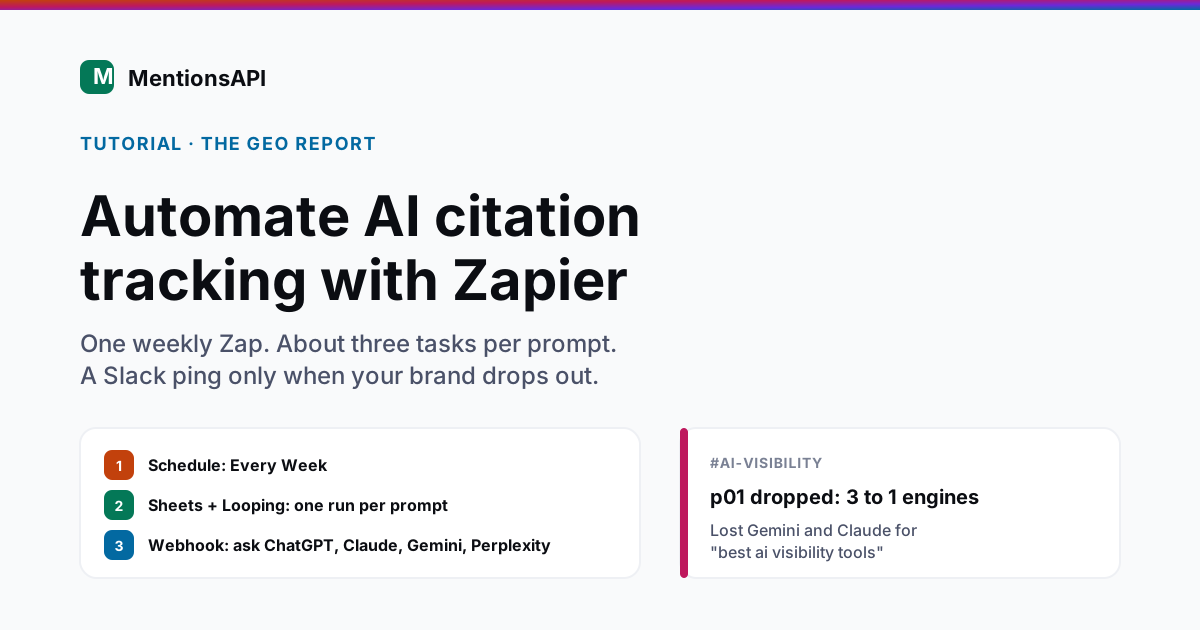
This is the Zapier edition of a tracker I have now built three ways. The Make version and the n8n version do the same job, but Zapier has its own billing rules and two traps worth knowing before you build.
Can Zapier track whether AI engines mention your brand?
Zapier can track AI brand mentions, but only if you build the tracker yourself, because it has no native app that reads ChatGPT or Perplexity answers. Its brand monitoring templates watch news and social feeds. What Zapier does give you is every piece you need: a scheduler, a loop, a webhook, a code step, a key-value store, and connectors for Google Sheets and Slack.
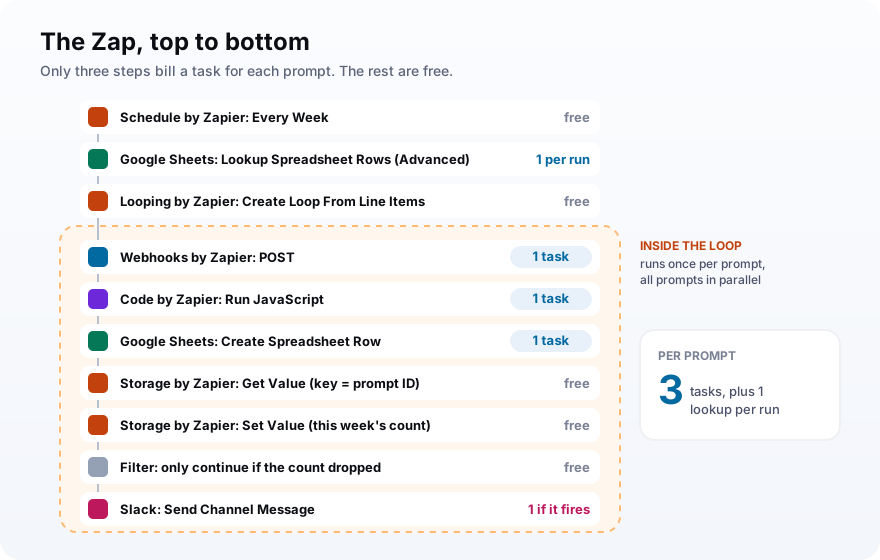
Here is the finished Zap, step by step:
| Step | What it does | Uses tasks? |
|---|---|---|
| Schedule by Zapier: Every Week | Starts the run | No (trigger) |
| Google Sheets: Lookup Spreadsheet Rows (Advanced) | Pulls active prompts as line items | Yes, once per run |
| Looping by Zapier: Create Loop From Line Items | Repeats the next steps per prompt | No |
| Webhooks by Zapier: POST | Asks the AI engines | Yes, per prompt |
| Code by Zapier: Run JavaScript | Counts engines, checks citations | Yes, per prompt |
| Google Sheets: Create Spreadsheet Row | Logs a dated result | Yes, per prompt |
| Storage by Zapier: Get Value, Set Value | Remembers last week's count | No |
| Filter by Zapier | Stops unless the count dropped | No |
| Slack: Send Channel Message | Reports the drop | Only when it fires |
What you need before you build the Zap
You need a Zapier Professional plan, a Google Sheet, a Slack channel, and a key for the AI data you want to check. Professional matters because the Free plan only allows two-step Zaps and does not include Webhooks by Zapier, and this Zap has nine steps and a webhook. Professional starts at $19.99 a month billed annually for 750 tasks.
Those plan limits come straight from Zapier's pricing page. Monthly billing on the same tier is $29.99.
Then line up the rest:
- A Google Sheet with a Prompts tab (columns ID, Prompt, Active) and a Log tab.
- A Slack channel for alerts, connected to Zapier.
- An AI data source: your own OpenAI or Perplexity keys, or one API key for a visibility API that checks several engines in a single request.
- A Storage by Zapier secret, which is just a UUID you generate once.
- Your brand name, its common misspellings, and your domain.
The ID column looks fussy. It is there for a reason you will hit in Step 5, so add it now.
Step 1: Trigger the Zap with Schedule by Zapier
Start the Zap with Schedule by Zapier and choose Every Week, then set the Day of the Week and the Time of Day. A weekly run is the right default for AI answers, because they drift over days, and a single run is noisy anyway. Daily is available if you are watching a launch, but it multiplies your task bill by about seven.
Zapier's scheduling help article covers the monthly, weekly, daily, and hourly options. The trigger itself never uses a task.
Pick Monday morning. Then the alert lands in Slack at the start of the week, while you can still do something about it.
Step 2: Pull your prompts and loop over them
Add Google Sheets Lookup Spreadsheet Rows (Advanced), search the Active column for TRUE, and it returns every matching row as line items. Then add Looping by Zapier with Create Loop From Line Items, mapping the ID and Prompt columns. Every step after the loop now runs once per prompt, and the Looping step itself costs no tasks.
The lookup returns up to 500 rows, and a loop can run up to 500 times, per Zapier's Looping documentation. You will not get near that with a sensible prompt list.
The same page has the first trap. Loop iterations run in parallel, all at once, not one after another.
Ten prompts means ten requests leaving Zapier at the same moment. If your API has a per-minute rate limit, some of them will bounce.
A Zap can only have one Looping step, and loops cannot be nested. That is fine here, since everything happens inside the single prompt loop.
Step 3: Ask the AI engines with Webhooks by Zapier
Add Webhooks by Zapier and choose POST. Set the Payload Type to json, enter the API URL, add your prompt and brand in the Data fields, and put your key in an Authorization header. Zapier sends one request per prompt and exposes the response fields to the next step. Webhooks is a premium feature, which is the main reason this Zap needs a paid plan.
POST is easier than Custom Request for this. Zapier builds the JSON from your Data fields, so you never write brackets by hand, as its webhooks guide explains.
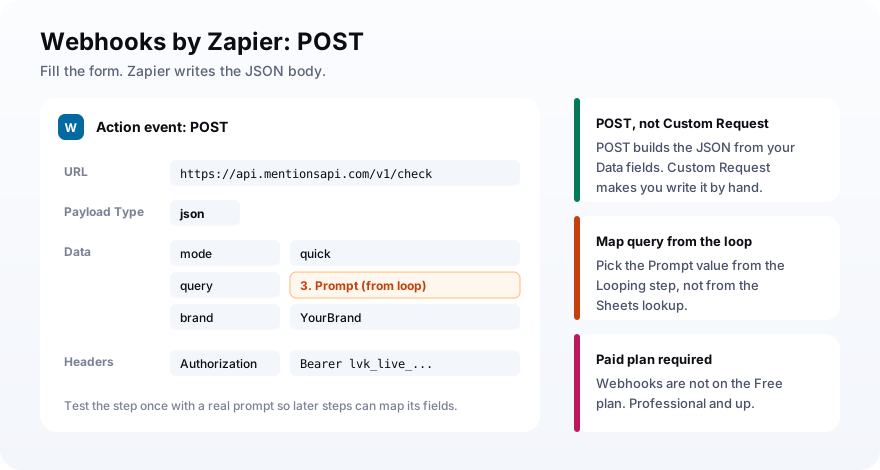
With a visibility API that covers all four engines, the step looks like this:
URL:           https://api.mentionsapi.com/v1/check
Payload Type:  json
Data:          mode   -> quick
               query  -> (Prompt from the loop)
               brand  -> YourBrand
Headers:       Authorization -> Bearer lvk_live_...
You can also skip the webhook for one engine. Zapier has native ChatGPT and Perplexity apps, and the tradeoff looks like this:
| Approach | Tasks per prompt | Catch |
|---|---|---|
| Native ChatGPT or Perplexity app | One per engine | Citation fields vary, and four engines means four steps |
| Webhook to each engine API | One per engine | Separate keys and response shapes to parse |
| One webhook to a visibility API | One for all engines | A per-check fee, but fields arrive normalized |
On Zapier the per-engine approach hurts more than it looks, because every extra engine step runs inside the loop. Four engines and ten prompts is forty tasks before you log a single row.
Step 4: Score the answer with Code by Zapier
Add a Code by Zapier step running JavaScript, map each engine's mentioned flag and citation URLs into its Input Data, and let a dozen lines turn the raw response into clean fields. The code counts how many engines named your brand and checks whether your domain appears in each citation list. Those outputs feed the log, the Storage comparison, and the Slack message.
Zapier passes Input Data in as text, so the code compares against the string true. Name the inputs chatgpt_mentioned, chatgpt_citations, and so on for each engine, then paste this:
const domain = 'yourbrand.com';
const engines = ['chatgpt', 'claude', 'gemini', 'perplexity'];
const out = { engines_naming_you: 0 };

for (const e of engines) {
  const mentioned = String(inputData[e + '_mentioned']) === 'true';
  const cited = (inputData[e + '_citations'] || '').includes(domain);
  if (mentioned) out.engines_naming_you += 1;
  out[e + '_mentioned'] = mentioned;
  out[e + '_cited'] = cited;
}

return out;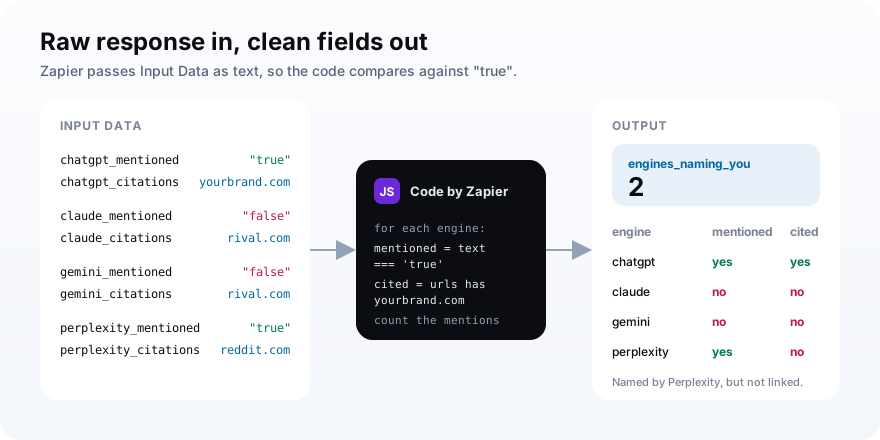
Keep mentioned and cited as separate fields. A mention means the engine said your name, while a citation means it linked your site as a source, and only the second one can send a visitor.
Those visitors are starting to matter. Traffic to US retail sites from generative AI tools rose 693.4% year over year across the 2025 holiday season, according to Adobe Analytics, even though Adobe notes the base is still modest.
Step 5: Log the row and alert only on a drop
Add Google Sheets Create Spreadsheet Row to log the date, prompt, and Code outputs. Then add Storage by Zapier Get Value keyed by the prompt ID, Set Value to save this week's engine count under the same key, a Filter that continues only when the new count is lower than the stored one, and a Slack channel message. Storage and Filter cost no tasks.
Here is the second trap. Storage keys max out at 32 characters, according to Zapier's Storage documentation, and most real buyer prompts are longer than that.
So key everything on the short ID column, like p01 or p02. The same page says unused keys are deleted after two months, which a weekly Zap never hits.
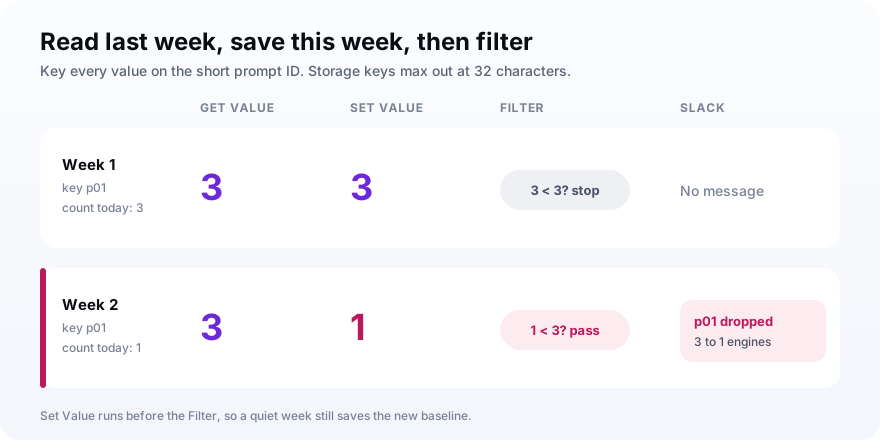
Order matters here. Put Set Value before the Filter, or a week with no drop would stop the Zap before it saves, and next week would compare against stale data.
Set the Filter to Only continue if the Code step's engines_naming_you (Number) Less than the value from Get Value. If Get Value finds nothing on the first run, the Filter stops, which is what you want.
Slack should only hear about changes. A standing weekly ping teaches people to skim past it, and then nobody reads the one that mattered.The rule for the Slack channel
How many Zapier tasks does AI citation tracking use?
AI citation tracking in Zapier uses about three tasks per prompt per run, plus one for the spreadsheet lookup. Zapier bills each successful action step once, and the Schedule trigger, Looping, Storage, Filter, and Delay steps are all free. So ten prompts cost about 31 tasks a run, roughly 133 a month on a weekly schedule, well inside the 750-task Professional tier.
The free-step list comes from Zapier's task usage article, which also excludes Formatter, Tables, and steps that never run because a Filter stopped them.
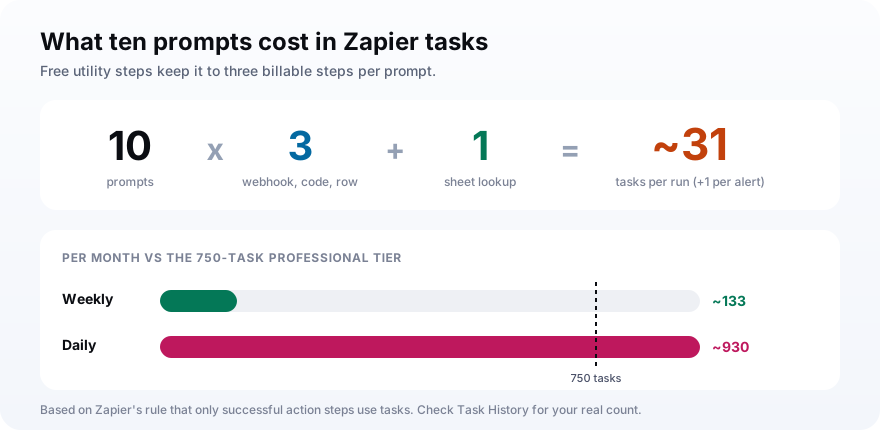
| Prompts | Tasks per run | Weekly, per month | Daily, per month |
|---|---|---|---|
| 5 | about 16 | about 69 | about 480 |
| 10 | about 31 | about 133 | about 930 |
| 25 | about 76 | about 327 | about 2,280 |
Want to trim it further? If you only care about the mention count, a Formatter step can replace the Code step at no task cost, which drops you to two tasks per prompt.
Zapier tasks are one bill, and the API you call is the other. On MentionsAPI, a fresh quick check across all four engines is 150 credits, and repeating a recently asked query costs 5.
Zapier, Make, or n8n for AI citation tracking?
Choose Zapier for AI citation tracking when your team already lives in it and values setup speed over cost per step. Make bills per module action and handles branching visually, which suits ops teams on a budget. n8n bills per execution and can be self-hosted, which suits developers. All three run the same weekly tracker, so pick the one your team will actually maintain.
| Question | Zapier | Make | n8n |
|---|---|---|---|
| Billing unit | Task per action step | Credit per module action | Execution per run |
| Free plan fits? | No (two steps, no webhooks) | Yes, weekly | Yes, self-hosted |
| Loop over prompts | Looping by Zapier | Search Rows bundles | Items fan out |
| Remember last run | Storage by Zapier | Data store | Sheet lookup or database |
I would not switch tools just for this Zap. The tracker is small, and the cost of learning a second automation platform is bigger than any task savings.
How to read the log without chasing noise
Read the Log tab as a weekly rate instead of a pile of individual answers. Work out how often each engine named you across your prompts, week by week, and watch that number move. Single answers are close to random: a SparkToro and Gumshoe study found less than a 1-in-100 chance that an AI tool returns the same brand list twice for the same prompt.
That study ran 2,961 prompts through ChatGPT, Claude, and Google's AI, as Search Engine Journal reported. The lists kept changing, but how often each brand appeared held much steadier.
So chart the rate, ignore a single bad week, and act when the line bends for three or four weeks in a row.
When a prompt keeps losing, go fix the page that should win it. The Princeton GEO study found that adding statistics and cited sources raised visibility in AI answers by 30% to 40%. Our guides on share of model and prompt monitoring cover the next layer of analysis.
Mistakes that break a Zapier AI tracker
Most broken Zaps here fail on Zapier-specific details rather than on the AI part. They run without errors, the Sheet fills, and the numbers are quietly wrong or the alert never fires. These are the ones to check first, roughly in the order people hit them.
- Using the full prompt as the Storage key, which breaks past 32 characters.
- Placing Set Value after the Filter, so quiet weeks never save a new baseline.
- Growing the prompt list past your API rate limit while loop iterations fire in parallel.
- Calling four engines with four steps inside the loop, which quadruples the task bill.
- Writing prompts with your brand in them, which inflates the mention rate.
- Comparing the mentioned field to a boolean in Code when Zapier passed it in as text.
- Running daily on a 750-task tier and hitting overage in the third week.
Frequently asked questions
Can Zapier track whether ChatGPT mentions my brand?
Can I build an AI citation tracker on the Zapier free plan?
How many Zapier tasks does an AI citation tracking Zap use?
How do I stop Zapier from sending the same Slack alert every week?
How do I loop through Google Sheets rows in Zapier?
Should I use Zapier, Make, or n8n to track AI citations?
Turn the Zap on, then leave it alone for a month
To automate AI citation tracking with Zapier this week: build the nine steps with five prompts, test each step with real data, publish the Zap, and set it to run Monday mornings. Do not touch it for four weeks. A month of rows gives you a baseline, and every alert after that means something.
Then expand where the Log shows gaps. If you want to keep the loop at one billable webhook however many engines you add, point it at an AI-visibility API like MentionsAPI.