You can watch your Google rankings all day and still have no idea what ChatGPT tells a buyer who asks about your category. That blind spot is where this agent lives.
Here is the thing about AI search. The answer your buyer reads is generated fresh, it names a handful of brands, and you have no report that tells you whether you were one of them.
Most people fix this by buying a monitoring dashboard. That works. But if you spend your day in Claude Code already, there is a faster path: turn Claude Code itself into the agent that runs the checks.
This guide shows you how to set up an AI brand-visibility agent in Claude Code using one MCP server. You will connect it, run your first check across four engines, and turn it into a standing monitor.
What is an AI brand-visibility agent?
An AI brand-visibility agent is an assistant that checks whether AI engines name and cite your brand, then acts on what it finds. In Claude Code, it is the CLI plus one connected tool server: you ask a question in plain English, the agent calls a tool that queries ChatGPT, Claude, Gemini, and Perplexity, and it reports whether you were mentioned, where you ranked, and whether you were cited with a link. It runs checks, logs them, and flags competitors.
The reason this matters now is that AI answers have become a real referral channel, and a fast-growing one.
ChatGPT referrals to news sites grew from just under one million visits across January to May 2024 to more than twenty-five million in 2025, a twenty-five-fold jump, according to Similarweb data reported by TechCrunch. The answers are read by your buyers whether or not you measure them.
An agent is a good fit for this job because the work is a loop, not a single lookup.
You check a prompt, read the answer, notice a gap, check a related prompt, compare against a rival, then decide what to change. That back-and-forth is exactly what an agent in Claude Code is built for, and it is why this reads differently from a static dashboard.

What you need before you start
Before you connect anything, line up five things. None of them take more than a minute, and most developers already have the first two. Gather these and the setup itself is about fifteen minutes.
- Claude Code installed and working in a terminal. A Claude paid plan covers it.
- Node.js 20 or newer, since the MCP server runs through npx.
- A MentionsAPI key from mentionsapi.com, minted on the keys page (it looks like
lvk_live_...). Signup includes $1 of free credit. - Your brand facts: exact brand name, common variations, and your domain.
- Five to fifteen buyer prompts, the real questions a prospect asks an AI about your category.
One note on the prompts, because they decide whether the whole thing is worth running.
Keep them neutral and buyer-shaped. Ask what a prospect would ask, like best tools for X, rather than a question with your name baked in, because a self-named prompt only proves the model can describe a company you handed it. Our guide on prompt monitoring covers how to pick prompts that map to real buying decisions.
How do I add the MentionsAPI MCP to Claude Code?
Add the server to Claude Code by dropping a block under mcpServers in your ~/.claude.json file, with the command that runs the server and your key as an environment variable. Claude Code reads MCP servers from that config on startup, as the official Claude Code MCP docs describe. Restart, and the four tools become available to ask against in plain English.
Here is the exact block. Paste your key where shown:
{
  "mcpServers": {
    "mentionsapi": {
      "command": "npx",
      "args": ["-y", "@mentionsapi/mcp@latest"],
      "env": { "MENTIONSAPI_KEY": "lvk_live_..." }
    }
  }
}
Prefer the command line? One call does the same thing.
claude mcp add-json mentionsapi '{
  "command": "npx",
  "args": ["-y", "@mentionsapi/mcp@latest"],
  "env": { "MENTIONSAPI_KEY": "lvk_live_..." }
}'
Then confirm it loaded before you trust it.
Restart Claude Code and run claude mcp list. You want to see mentionsapi in the list marked as connected. If it is missing, the usual cause is a stale session, so restart once more.
env block, not in a prompt or a committed file. For a project-scoped setup you can use a .mcp.json at the repo root instead and reference the key as ${MENTIONSAPI_KEY} so it stays out of version control.The reason this takes minutes and not a day is the Model Context Protocol itself.
MCP is the open standard Anthropic shipped in late 2024 so any client can talk to any tool server. By its December 2025 ecosystem update, Anthropic counted more than 10,000 active public MCP servers and roughly 97 million monthly SDK downloads, up from about 2 million at launch, per the Model Context Protocol record. You are plugging into a standard rather than a bespoke integration.
The server also onboards itself if you jump in without a key.
Call a tool before you have set MENTIONSAPI_KEY and it returns a short auth-required message instead of an error, with the signup and key-minting steps spelled out. Your agent reads that back to you and can walk you through it, so a missing key is a nudge, not a dead end.
The four tools your agent gets
Connecting the MCP gives your agent four tools: mentions_check to test a prompt across engines, mentions_watch to set a standing monitor, mentions_discover to find prompts worth tracking, and mentions_compare to diff two brands or two prompts. You never type the tool names. You ask in plain English and the agent picks the right one.
| Tool | What it does | Ask it like |
|---|---|---|
| mentions_check | Checks a prompt across the AI engines and returns mentions, ranks, citations, and fan-out queries | "Does ChatGPT name us for best CRM for startups?" |
| mentions_discover | Suggests ~50 prompts to track, spanning informational, commercial, and comparison intent | "What prompts should I be tracking for my brand?" |
| mentions_compare | Computes the delta between two brands or two prompts | "Compare us against Competitor X on that prompt." |
| mentions_watch | Sets a persistent monitor that webhooks you when mentions, ranks, or citations change | "Watch this prompt and alert me if we drop out." |
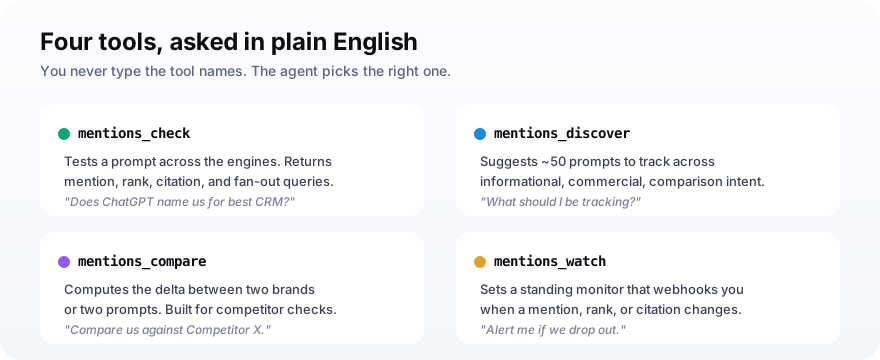
The one you will use most is mentions_check, and it has a cost dial worth knowing.
A quick check queries all four LLM engines in parallel for $0.39 fresh, or $0.02 on a cache hit. If you want ground truth from a single live surface, those run cheaper: $0.05 for an AI Overview check, $0.10 for ChatGPT or Gemini live, $0.25 for Perplexity live. All six live surfaces bundled cost $0.50.
Run your first brand-visibility check
To run your first check, type a plain-English request naming a real buyer prompt and let the agent call mentions_check. It queries the engines and returns whether your brand was mentioned, what rank it held in the answer, which sources were cited, and the fan-out queries the engine ran behind the scenes. You read that like a scorecard: named or not, ranked where, cited or merely mentioned.
Something like this:
You: Use mentions_check (quick mode) to see if Notion is named
     for "best note taking app for teams" across all four LLMs.

Claude: Notion is named by 4 of 4 engines.
  - ChatGPT: ranked 2nd (cited notion.so)
  - Claude: ranked 1st (mentioned, no link)
  - Gemini: ranked 3rd
  - Perplexity: not in the top list; cited a G2 roundup instead
That last line is the useful one.
A mention is the model saying your name. A citation is the model linking to you as a source, which carries more weight and sends the occasional click.
When Perplexity leaves you out and cites a G2 roundup instead, you know exactly where the next bit of work goes: that roundup. Our walkthrough on checking if ChatGPT mentions your brand goes deeper on reading these results.
Check more than one engine, always, because they disagree and they are moving at different speeds.
From September to November 2025, ChatGPT referrals grew 52% year over year while Gemini referrals grew 388% in the same window, per Similarweb figures compiled by Digiday. Track one engine and you go blind to the one your buyers are moving to.
Turn the check into a standing agent
To make the agent repeat itself instead of starting cold each time, give it two files and one monitor. A short agent definition in ~/.claude/agents/ tells Claude Code how to run visibility checks, a CLAUDE.md in your project holds your brand name, domain, and prompt list, and a mentions_watch monitor webhooks you when a result changes. Now the knowledge persists and the checks run the same way every time.
The agent definition is plain Markdown with a bit of frontmatter.
---
name: brand-visibility
description: Checks whether AI engines name our brand and flags competitors.
tools: mentions_check, mentions_compare, mentions_discover
---

Run mentions_check on each prompt in CLAUDE.md across all 4 LLMs.
Report mention, rank, and citation per engine.
Flag any prompt where a competitor is named and we are not.
Claude Code loads custom agents from Markdown files in your .claude/agents/ folder, and skills from SKILL.md folders, as the subagents docs explain. A subagent runs in its own context window, so a long visibility sweep does not clutter your main session.
The CLAUDE.md part is where the compounding happens.
Each time you learn something, like which prompts you lose or which competitor keeps surfacing, you write it into that file. The agent reads it on every run, so your checks get sharper over weeks instead of resetting. That is the quiet advantage an agent has over a one-off query.
A one-off check tells you today's answer. A standing agent with your brand context tells you what changed, and changed answers are the only ones worth your time.The reason to make it standing
Should you use an agent, a dashboard, or an n8n workflow?
Pick the agent when you work hands-on and want to investigate, the dashboard when a team needs shared charts and history, and a workflow when you want unattended tracking that just logs. All three can run on the same underlying checks, so this is about where you want to sit rather than which data is right. Most operators end up running two of the three.
| Setup | Best for | The tradeoff |
|---|---|---|
| Claude Code agent | Hands-on investigation, ad-hoc questions, acting on the answer now | Interactive, not unattended |
| Monitoring dashboard | Teams that need charts, history, and shared logins | Another subscription and tab |
| n8n workflow | Unattended daily tracking that logs to a sheet and alerts Slack | You build and maintain it |
A common, sane combination: the agent for daily hands-on checks, a scheduled job for the unattended log.
If you want the unattended side, our guide on automating AI citation tracking with n8n builds exactly that, and the API vs dashboard comparison covers the buy-versus-build call in more depth.
Mistakes that make a visibility agent lie to you
A few setup mistakes quietly corrupt what the agent tells you, and each one is easy to avoid once you know it. The danger is not a crash. It is a confident wrong answer that sends you fixing the wrong thing. Watch for these.
- Prompts with your name in them: they test recall, not discovery, and make you look more visible than you are.
- Checking one engine: you miss Gemini and Perplexity, where your buyers may already be.
- Running fresh checks on everything: you burn credit when cache hits cost $0.02; reserve fresh and live modes for prompts that matter.
- Reacting to a single run: AI answers wobble day to day, so trust the trend across a week, not one dip.
- No brand context file: without a CLAUDE.md the agent forgets what it learned and you re-explain your brand every session.
- Confusing a mention with a citation: being named is not being linked, and only the citation sends a visitor.
Get those right and the agent earns its place in your terminal.
Once your checks are clean, the next move is lifting the prompts you lose. The Princeton GEO study found that adding statistics and citations to a page raised its visibility in AI answers by 30 to 40%. That is the kind of fix you point at the prompts your agent flags.
Frequently asked questions
Can Claude Code check if ChatGPT mentions my brand?
How do I add an MCP server to Claude Code?
Do I need to code to build an AI visibility agent?
How much does it cost to track brand mentions across AI engines?
Is a Claude Code agent better than a brand-monitoring dashboard?
What is the difference between this and the n8n workflow?
Connect it once, then ask
Do this next: mint a key, paste the MCP block into ~/.claude.json, restart, and run one mentions_check on your top buyer prompt. That single check tells you more about your AI brand visibility than a week of staring at Google rankings.
Then decide how hands-on you want to be. Keep it as a question you ask Claude Code when you are curious, or promote it to a standing agent with a brand file and a monitor so the answer finds you when it changes. Either way, the engines are describing your market to buyers today, and now you can see what they say.