Most of these comparisons ask which AI monitoring tool is best. The sharper question is whether you need to pay for a tool at all.
Every AI brand monitoring dashboard sells the same core job: check whether ChatGPT and the other engines name your brand, then chart it over time. A few API calls do that job too. So before you line up dashboards, weigh the two models against each other, build versus buy. That fork decides your cost and coverage more than any feature list will.
Should you build AI brand monitoring with an API or buy a dashboard?
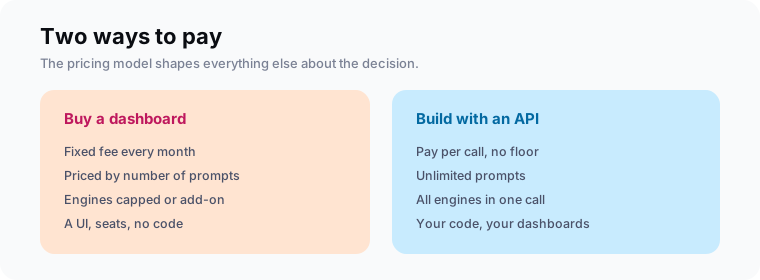
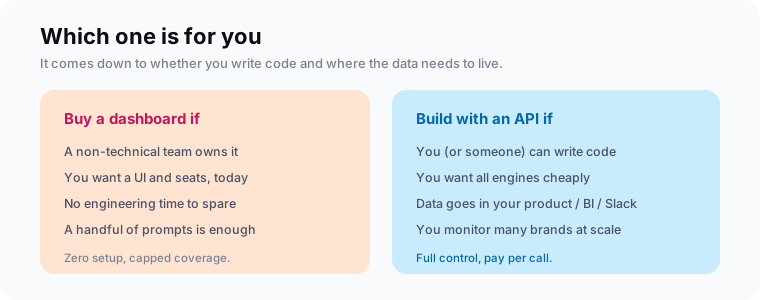
Buy a dashboard if the people who need the data cannot write code and want a UI today. Build with an API if you can script it and want every engine cheaply, or need the data inside your own product, BI tool, or Slack. The whole decision comes down to that: a dashboard is zero setup for a fixed fee, while an API is a little code and a per-call bill that stays lower up to fairly high volume.
What a dashboard costs
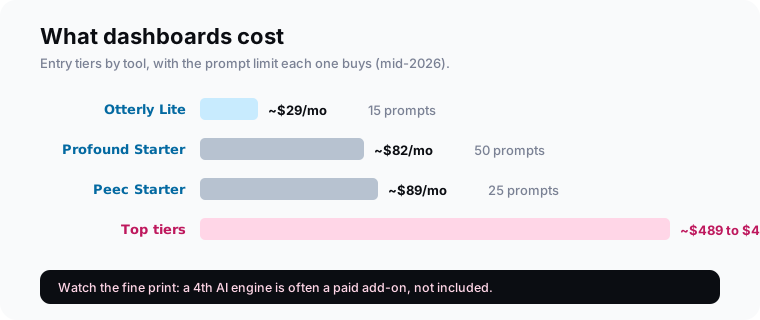
Dashboards charge a fixed monthly fee, priced by how many prompts you track. As of mid-2026, entry tiers start around $29/month for about 15 prompts (Otterly Lite), ~$82/month for 50 prompts (Profound Starter), and ~$89/month for 25 prompts (Peec Starter). Top self-serve tiers climb to roughly $489 to $499/month, as pricing comparisons show. The fee tracks the prompt ceiling rather than what you run.
What you get for that fee is real: a UI anyone can read, seats for the team, scheduled runs, alerts, and charts, with nothing to build or maintain. We compare the tools themselves in the best AI monitoring tools. If you want that convenience and only track a handful of prompts, a dashboard is a fair deal.
What an API costs
An API bills per call, with no monthly floor tied to a prompt count. With MentionsAPI a quick check is 130 credits, about $0.52, and it returns ChatGPT, Claude, Gemini, and Perplexity in one call. Cached identical checks drop to 5 credits, roughly 2 cents. There is no prompt cap: you run as many queries as you want and pay only for the calls you make.
curl https://api.mentionsapi.com/v1/check \
  -H "Authorization: Bearer $MENTIONSAPI_KEY" \
  -H "Content-Type: application/json" \
  -d '{ "mode": "quick", "query": "best CRM for startups", "brand": "HubSpot" }'
# 130 credits (~$0.52): ChatGPT, Claude, Gemini, and Perplexity in one call
That returns structured JSON from all four engines in a single call. The trade is that you write and run the code yourself, which comes to a few lines and a scheduler. If you want the walkthrough, we built it in how to check if ChatGPT mentions your brand, and the quickstart has the same call in Node and Python.
The cost crossover: where each wins
The API is cheaper up to fairly high volume. Checking 15 prompts weekly across all four engines runs about $40/month on the API, close to a comparable dashboard tier but with more engines. At 50 prompts weekly, the API is about $110/month against roughly $245 to $332 for a dashboard. Flat-fee dashboards only pull ahead at very high daily volume, or when a UI is worth more to you than the savings.
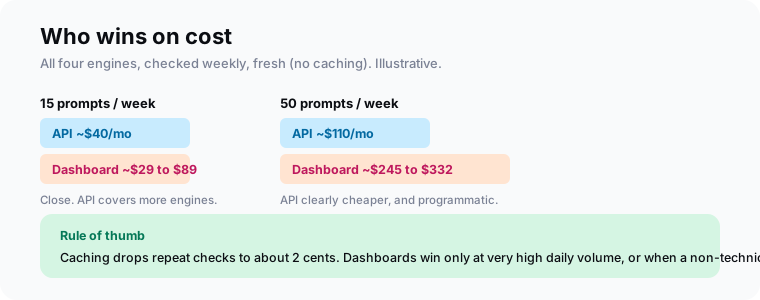
These are fresh-check numbers, so they are the pessimistic case for the API. Most monitoring reuses the same prompts week to week, which caching serves for about 2 cents. The dashboard fee, meanwhile, is the same whether you check once a month or never.
The hidden difference: engine caps
Dashboards cap the engines as well as the prompts. Several tools include three AI engines on their self-serve plans and sell a fourth, commonly Gemini, as a paid add-on. So the sticker price may not cover the full set of engines your buyers actually use. One API quick check returns all four together, with Google AI Overviews, AI Mode, and Bing Copilot on other calls.
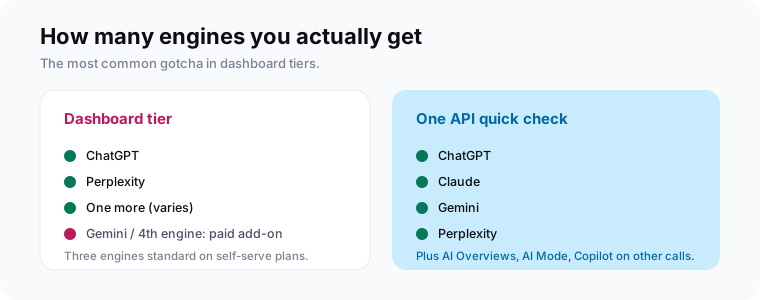
The dashboard price you compare is often for three engines. If your buyers use Gemini too, the real price is the tier plus an add-on, per model.The gotcha
| Dashboard | API + code | |
|---|---|---|
| Pricing | Fixed monthly, by prompt count | Per call, no floor |
| Prompts | Capped by tier | Unlimited |
| Engines | 3 standard, 4th often add-on | All 4 in one call |
| Setup | None | A few lines + scheduler |
| Where data lives | The tool's UI | Your product, BI, or Slack |
| Best for | Non-technical teams | Developers + scale |
Control, integration, and lock-in
The deeper difference is where your data lives. A dashboard keeps it in the vendor's UI, which is fine until you want the raw per-run numbers in your own reporting and find they do not export cleanly. An API hands you structured JSON you own, so mentions can land in a warehouse, a Slack alert, or a customer-facing report. Build the pull once and you can route that data wherever your reporting lives.
This is why agencies and product teams lean toward the API. If you monitor many brands, or need mention data inside a product you sell, a per-call API scales with you where a per-seat, per-prompt dashboard does not. We get into that tracking setup in AI search tracking.
Which should you choose?
Choose by two questions: can someone write code, and where does the data need to live? If a non-technical team owns this and wants a UI today, buy a dashboard and move on. If you can script it and want all engines cheaply, or need the data in your own systems, build with an API. Most teams that pick the API do it for control and coverage as much as for the lower bill.
Frequently asked questions
Should I build AI brand monitoring with an API or buy a dashboard?
How much does AI brand monitoring cost?
Do AI monitoring dashboards cover all the AI engines?
Is an API cheaper than a dashboard for tracking AI mentions?
When is a dashboard the better choice?
Can I start with an API and move to a dashboard later, or vice versa?
Run the numbers on your own volume
Before you subscribe to anything, count the prompts you actually want to track and how often. Multiply by about $0.52 a check for the API, then compare that to the dashboard tier that covers the same prompt count and all four engines, add-ons included. The honest total usually comes in under the sticker on the dashboard.
Then pick for the next year, not just this month. If a non-technical team needs the UI, buy. If you can code and want control, build. Either way, start from a real check of your own brand, which you can pull today with a single API call.