ChatGPT decides which brands to consider before it reads a single page. You can see that decision in the search it runs.
To see ChatGPT's query fan-out, you need a tool that records the searches it runs behind each answer. The OpenAI API exposes them in its web search output, and scraper APIs or live capture modes return them for the ChatGPT app. The two can differ a lot. In our test, the app ran one or two broad searches, while the API ran five on average and checked official pricing pages.
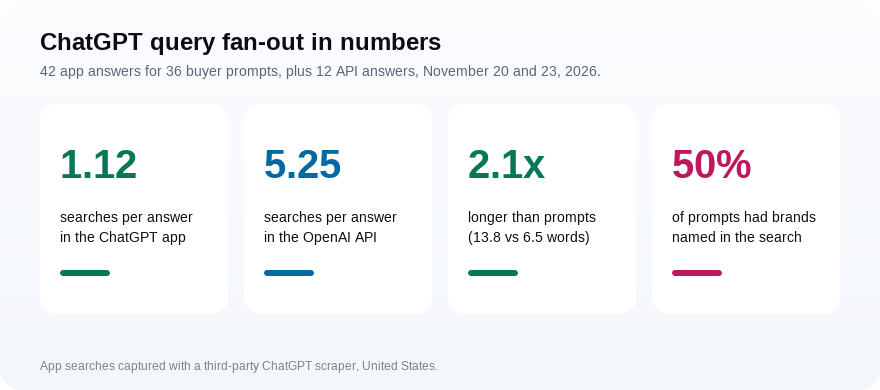
I captured 42 ChatGPT app answers for 36 different buyer prompts on November 20 and 23, 2026, in the United States, through DataForSEO's ChatGPT scraper. For six of those prompts I also ran the OpenAI API twice each with web search on, and compared the searches both sides made.
Disclosure: MentionsAPI sells AI visibility data, and our live ChatGPT mode returns these search queries. The capture for this post used a third-party tool so the numbers do not depend on our own product.
What is query fan-out?
Query fan-out is the step where an AI search system turns your question into one or more web searches, runs them, and writes an answer from what comes back. Google named the technique for AI Mode, which breaks a question into subtopics and searches them at the same time. ChatGPT does the same thing at a smaller scale. The queries it picks decide which pages it reads and which brands it is likely to name.
Google described it when it launched AI Mode in its May 2025 announcement: AI Mode "uses our query fan-out technique, breaking down your question into subtopics and issuing a multitude of queries simultaneously on your behalf." The same post says Deep Search can issue hundreds of searches for a single question.
Google's Search Central guide to AI features gives the site-owner version, saying AI Overviews and AI Mode may issue multiple related searches across subtopics and data sources.
OpenAI describes ChatGPT the same way. Its help article on ChatGPT search says ChatGPT "typically rewrites your query into one or more targeted queries" before searching.
How many searches does ChatGPT run per prompt?
In our capture, the ChatGPT app ran 1.12 searches per answer: 37 answers used one search and five used two. None used more. That is a much narrower fan-out than Google describes for AI Mode. Each search, though, packed a lot in. The average query ran 13.8 words, against 6.5 words for the prompt it came from, because ChatGPT added the year, buying terms, and often brand names.
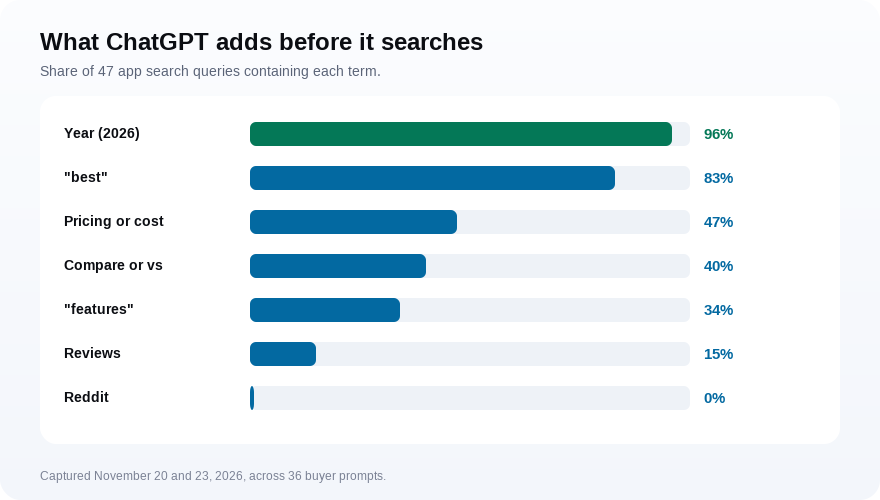
The modifiers ChatGPT added were consistent. The year appeared in 96% of app queries, "best" in 83%, pricing or cost terms in 47%, comparison words in 40%, and "features" in 34%. Only 15% asked for reviews.
None of the 47 app queries mentioned Reddit. ChatGPT may still cite Reddit threads, but it did not search for the site by name in this sample.
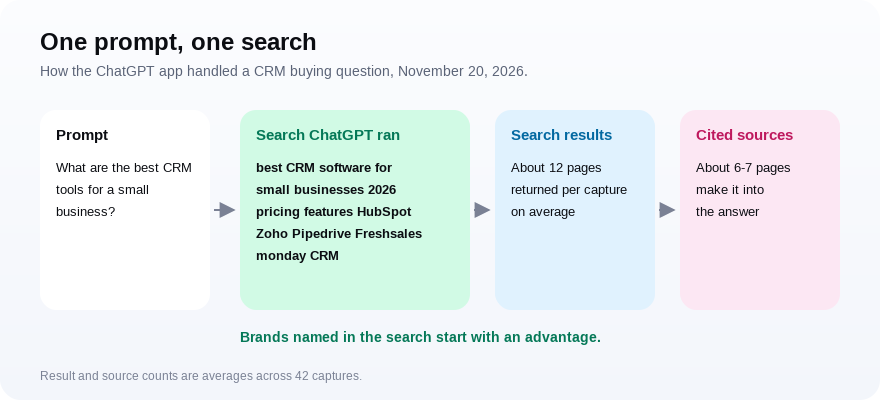
Each capture returned 12.6 search results and 6.7 cited sources on average. So one or two searches fed about a dozen candidate pages, and roughly half of them made it into the answer as sources.
What do ChatGPT's fan-out queries look like?
ChatGPT's fan-out queries read like a buyer's research search written in one go. They start from the category, add the current year and words like best, pricing, and features, and often list the brands ChatGPT already expects to compare. In 18 of our 36 prompts, the query named specific brands before any search result came back, so those brands were in the running from the first step.
| Prompt we asked | Search ChatGPT ran |
|---|---|
| What are the best CRM tools for a small business? | best CRM software for small businesses 2026 pricing features HubSpot Zoho Pipedrive Freshsales monday CRM |
| What is the best email marketing platform for ecommerce? | best email marketing platforms for ecommerce online stores Klaviyo Omnisend Mailchimp Shopify Email features pricing comparison 2026 |
| Which password manager is best for families? | best family password managers 2026 family plan features pricing 1Password Bitwarden Proton Pass Dashlane |
| What is the best running shoe for beginners? | best running shoes for beginners how to choose fit cushioning stability daily trainer 2026 |
The CRM query is the clearest case. HubSpot, Zoho, Pipedrive, Freshsales, and monday CRM were in the search itself. A CRM brand outside that list could still be named, but only if the pages returned for that query mentioned it.
The running shoe query went the other way. It named no brands and searched for buying advice instead, such as fit, cushioning, and stability. Not every category gets the brand treatment.
Health and money topics changed the pattern. For life insurance, ChatGPT searched for a NAIC consumer guide, and for acne treatment it searched for American Academy of Dermatology guidance. In both cases it went to a named authority before any brand.
Location crept in too. A meal kit prompt with no city in it produced a query that included Seattle, which points to the location of the capture shaping the search.
Does ChatGPT run the same searches every time?
Mostly, yes. We captured six prompts twice each in the ChatGPT app on the same day. Four of the six produced a word-for-word identical search both times, including the CRM, project management, email marketing, and password manager prompts. Across all six pairs, the two runs shared 84% of their query words. That makes fan-out queries steadier than the answers built from them.
Two prompts did change. The running shoe prompt kept its meaning but changed its wording, from "how to choose fit cushioning stability" to "daily trainers fit cushioning recommendations."
The AI brand-tracking prompt ran two searches each time, and the second run added Scrunch AI to the brand list in its query. One run in, one run out. For a brand on the edge of a category, that is the difference between being searched for and being left to chance.
In practice, you do not need dozens of runs to learn what ChatGPT searches for a prompt. Two or three captures usually show the pattern, and a change from one week to the next is more likely to mean something real, such as a new comparison article ranking or a brand entering the category.
Why does the ChatGPT API fan out differently?
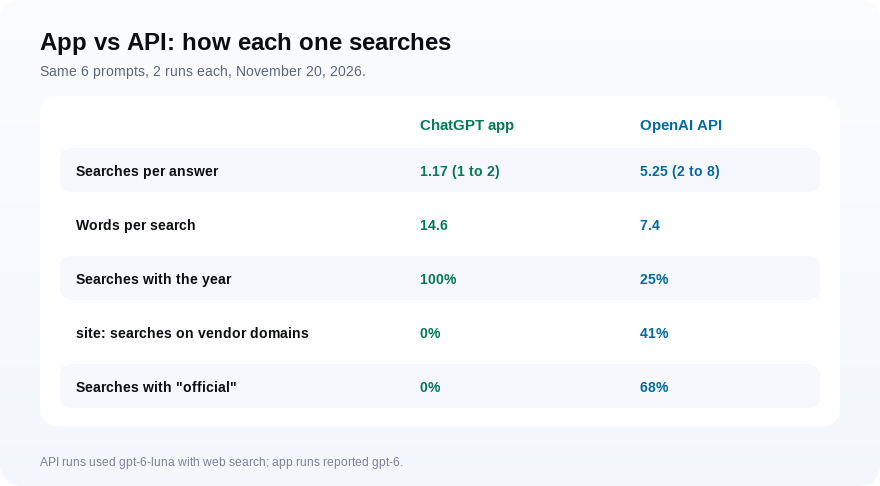
The OpenAI API fans out wider and aims at official pages. On the same six prompts, run twice each, the API with web search ran 5.25 searches per answer, from two to eight, while the app ran 1.17. Of the API's 63 searches, 41% were site: searches on a vendor's own domain and 68% included the word official. The app used neither.
| Same 6 prompts, 2 runs each | ChatGPT app | OpenAI API |
|---|---|---|
| Searches per answer | 1.17 (1 to 2) | 5.25 (2 to 8) |
| Words per search | 14.6 | 7.4 |
| Searches with the year | 100% | 25% |
| site: searches on vendor domains | 0% | 41% |
| Searches with "official" | 0% | 68% |
For the CRM prompt, the API searched site:hubspot.com, the Zoho CRM pricing page, and site:pipedrive.com for plan details. For the AI brand-tracking prompt, it searched the sites of Otterly, Profound, Peec AI, and Ahrefs Brand Radar one by one.
So the API tends to check facts on vendor pages, while the app runs one long search and reads the comparison pages that come back. That fits what we found when we compared ChatGPT scraper and API answers: the two sides cited almost entirely different sources.
If you only study the API's searches, you will optimize for a ChatGPT your customers are not using.What the captures showed
How to see ChatGPT's query fan-out
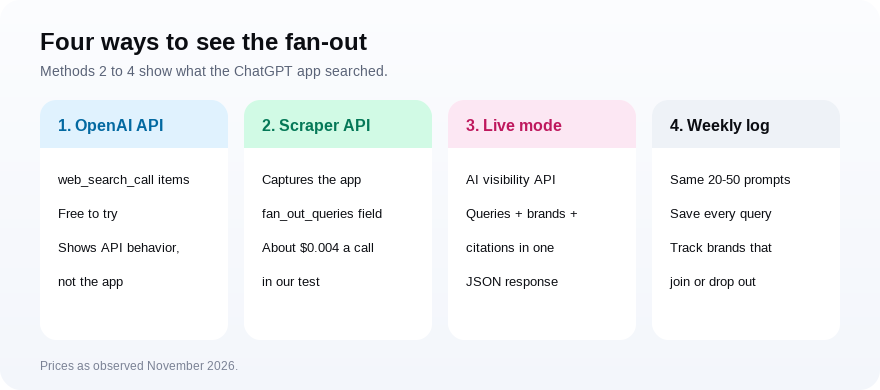
There are four practical ways to see ChatGPT's fan-out queries: read them from the OpenAI API's web search output, capture the ChatGPT app with a scraper that returns them, use an AI visibility API with a live ChatGPT mode, or log them on a schedule across a fixed prompt set. The API is free to try. The other three show the app, which is what your buyers use.
1. Read them from the OpenAI API
With the web search tool on, the Responses API returns a web_search_call item for each search. OpenAI's web search guide says its search action "usually (but not always) includes the search queries." This short script prints them:
from openai import OpenAI

client = OpenAI()
resp = client.responses.create(
    model="gpt-6-luna",  # the model we tested; use any search-capable model
    tools=[{"type": "web_search"}],
    input="What are the best CRM tools for a small business?",
)

for item in resp.output:
    if item.type == "web_search_call":
        action = item.action
        if action and action.type == "search":
            print(getattr(action, "query", None))
Remember what this shows. It is the API's fan-out, which in our test meant several narrow searches and vendor-site checks. It is useful, but it is not the app.
2. Capture the app with a scraper API
Some ChatGPT scraper APIs return the searches along with the answer. The one we used for this post returned a fan_out_queries list, the search results, the cited sources, and the brands it detected, at $0.004 per capture. Our scraper comparison lists other vendors and what each returns.
3. Use a live ChatGPT mode in an AI visibility API
MentionsAPI's chatgpt_live mode captures the ChatGPT app for a prompt and returns the fan-out queries with the brands, ranks, and citations, for 35 credits. The perplexity_live mode returns Perplexity's queries for 85 credits. Every response comes back in the same JSON shape, so you can store queries next to the brand data.
4. Log them across a fixed prompt set
To see patterns, run the same 20 to 50 buyer prompts each week and save the queries. Watch which brands appear inside the queries, and whether yours joins or drops out. Our guide to prompt monitoring covers how to pick the prompt set.
What about Google AI Mode's fan-out?
Google AI Mode fans out far wider than ChatGPT, but Google does not show users the queries it runs. Google says AI Mode issues many searches at once and Deep Search can run hundreds. In September 2026, Google Research also published a faster fan-out method that generates ten sub-queries at a time. Google has not said that method is live in AI Mode, so treat it as research.
The Google Research post on that method, called Retrieve-for-Train, reported a 12 to 20 times speedup in generating sub-queries.
For Google, you can only infer the fan-out from the sources AI Mode cites. For ChatGPT, you can read the queries directly, which makes it the easier engine to study.
What to do with ChatGPT's fan-out queries
Treat each fan-out query as a search your page has to rank for before ChatGPT can cite it. Our data suggests three moves: keep comparison and best-of pages dated and current, show pricing and features plainly, and get your brand onto the third-party lists ChatGPT already searches by name. For the API, make official pricing and plan pages easy to read.
- Put the current year in titles of comparison pages that should be current, and keep them updated.
- Show pricing, plan limits, and key features on the page, not behind a demo form.
- Check which brands ChatGPT names inside its queries for your category, and whether you are one.
- Earn a place on the comparison articles that rank for those queries.
- Keep your pricing page clear and crawlable, since the API checks vendor sites directly.
If your brand is not in the query, the search results have to carry you. Our guide on how ChatGPT search works explains the retrieval side, and where ChatGPT gets its information covers the sources.
Frequently asked questions
What is query fan-out?
How many searches does ChatGPT run per prompt?
Can you see the searches ChatGPT runs?
Does ChatGPT search with brand names?
How do fan-out queries help SEO?
Is query fan-out the same in Google AI Mode and ChatGPT?
Start with the searches, then the answers
Pick five buyer prompts in your category and capture the searches ChatGPT runs for each, from the app if you can. Note which brands appear in the queries and which pages rank for them. That tells you where ChatGPT looks before it answers, which is the part you can still change.
Our capture of 42 answers cost under 20 cents. Yours will take about ten minutes.