Ask the OpenAI API a question with web search on, print output_text, and you get a clean paragraph. The sources are somewhere else.
That matters more every month. ChatGPT reached 900 million weekly users in February 2026, TechCrunch reported, and developers keep building that kind of sourced answer into their own products.
To get citations from the OpenAI web search API, call the Responses API with the web_search tool and read the url_citation annotations on the message content, which hold each source's URL, title, and the text span it supports. Add include=["web_search_call.action.sources"] to get the full list of pages consulted, then strip leaked citation markers from the answer text.
I tested every parser in this guide against the official openai and anthropic Python SDK response models, so the field names below are the real ones.
Where does the OpenAI web search API put citations?
The OpenAI web search API puts citations in the message item's content annotations, and the answer text itself carries no links. Each annotation has type url_citation plus url, title, start_index, and end_index, and the two indexes mark the exact span of the answer that source supports. A separate web_search_call item records the search itself and, if you ask for it, every source consulted.
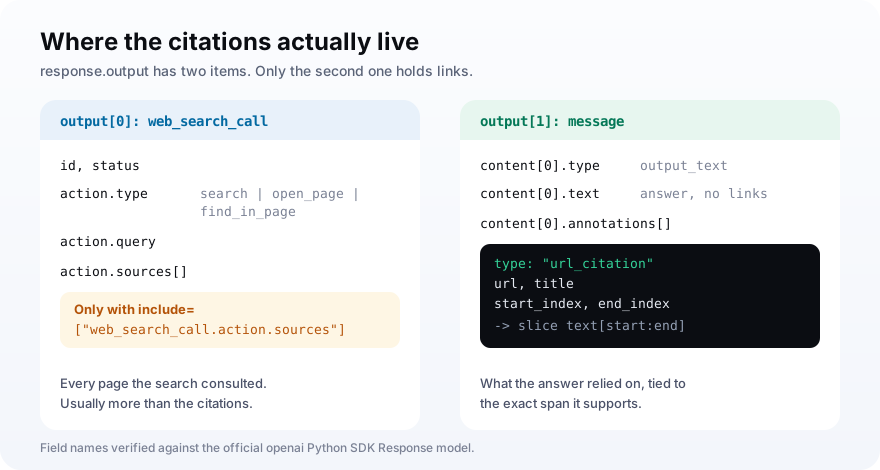
The response object does give you a convenience string, output_text. It is the joined answer text, and it carries no links at all.
The web_search_call item is worth reading too. Its action type is search, open_page, or find_in_page, so you can tell whether the model only saw your page in results or actually opened it.
So any code that stores output_text alone throws away the part you can verify. Read the annotations instead, and keep the start and end indexes, because they let you show exactly which sentence each source backs up.
How do you turn on web search in the Responses API?
Pass tools=[{"type": "web_search"}] to client.responses.create and the model can search before it answers. By default search is optional, so set tool_choice to "required" when you always want sources. OpenAI recommends gpt-5.5 for new integrations, and the legacy web_search_preview tool lacks newer controls such as domain filters.
from openai import OpenAI

client = OpenAI()

response = client.responses.create(
    model="gpt-5.5",
    tools=[{
        "type": "web_search",
        "search_context_size": "medium",
        "user_location": {"type": "approximate", "country": "US"},
    }],
    tool_choice="required",
    include=["web_search_call.action.sources"],
    input="What are the best AI visibility APIs for developers?",
)
The tool takes a handful of options, all listed in OpenAI's web search guide. These are the ones that change what gets cited:
| Option | Values | Effect on citations |
|---|---|---|
| search_context_size | low, medium, high | How much retrieved content the model sees |
| user_location | approximate country, city, region, timezone | Localizes which pages rank |
| filters.allowed_domains | Up to 100 domains | Restricts sources to listed sites |
| external_web_access | true (default) or false | false uses cached results only |
| tool_choice | auto or required | required forces a search every time |
Watch the model list too. That guide marks o4-mini as deprecated with a shutdown date of October 23, 2026, so pin a current model if you are building something that should still work next quarter.
The domain filter doubles as a research tool. Restrict allowed_domains to your site and three competitors, ask the same buyer question, and see which domain the model cites when it can only choose among you.
That isolates the content question from the discovery question. If the model still cites a competitor with your page in the pool, the competitor's page answers the question better, and you know which page to rewrite.
How do you parse url_citation annotations?
Loop over response.output, and for each message item walk its content parts and their annotations, keeping only entries whose type is url_citation. Slice the part's text with start_index and end_index to recover the exact sentence each source supports. Collect the web_search_call sources in one pass, so a single function returns both what was cited and what was read.
def openai_citations(response):
    """url_citation annotations from a Responses API result, plus the full source list."""
    cited, sources = [], []
    for item in response.output:
        if item.type == "web_search_call":
            action = getattr(item, "action", None)
            for s in getattr(action, "sources", None) or []:
                sources.append(s.url)
        elif item.type == "message":
            for part in item.content:
                for a in getattr(part, "annotations", None) or []:
                    if a.type == "url_citation":
                        cited.append({
                            "url": a.url,
                            "title": a.title,
                            "quote": part.text[a.start_index:a.end_index],
                        })
    return cited, sources


cited, sources = openai_citations(response)
print(len(cited), "citations from", len(sources), "sources consulted")
I ran this against a response validated into the SDK's own Response model. It returned the cited URL, its title, and the quoted span, along with all three consulted sources.
Two details save you debugging time. Use getattr with a default, because annotations can be missing, and slice the part's own text rather than output_text, because the indexes point into that part.
Citations vs sources: what is the difference?
Citations are the url_citation annotations tied to specific spans of the answer, so they show what the model relied on for each claim. Sources are every URL the search step consulted, and you only get them when you pass include=["web_search_call.action.sources"]. OpenAI notes that sources are usually more numerous than citations, so being read is not the same as being cited.
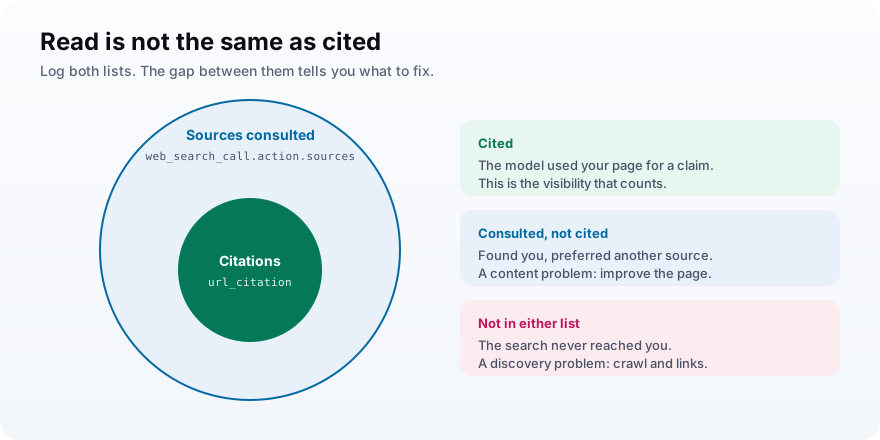
Log both lists. The gap between them is useful.
If your page shows up in sources but never in citations, the model found you and chose someone else. That is a content problem you can work on, and a very different one from not being found at all.
It also matters because citations are not always right. In a Tow Center study of 1,600 queries across eight AI search tools, the tools gave incorrect citation answers more than 60% of the time, Columbia Journalism Review reported. Perplexity was wrong on 37% and Grok 3 on 94%.
Why are the url_citation annotations empty?
Empty annotations usually mean the model answered without searching, or the request asked for structured JSON output, which developers report can strip annotations. The legacy web_search_preview tool shows it most. Force a search with tool_choice set to required, keep citation requests in plain text output, and collect annotations from stream events when you stream.
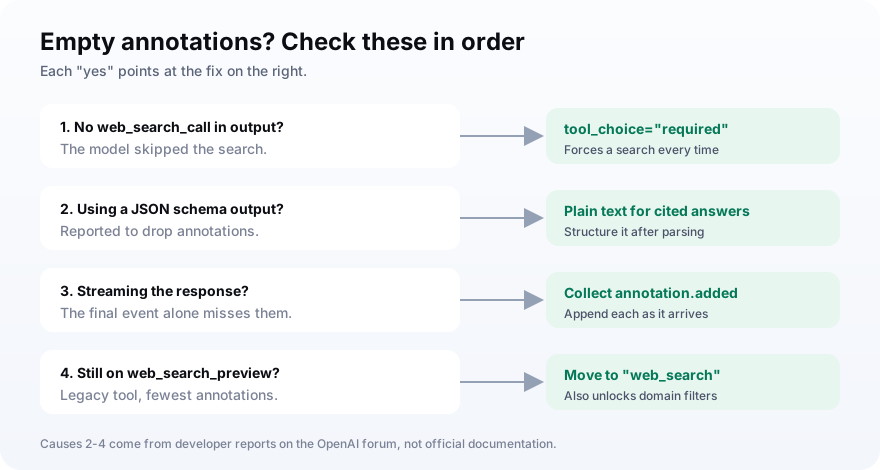
These are the causes developers keep hitting, roughly in order of how often they come up:
- Search was optional and the model skipped it, so there was nothing to cite.
- The request used a JSON schema output format, which forum reports tie to empty annotations.
- The code read only the final event of a stream and missed the annotation.added events.
- The integration still uses web_search_preview instead of web_search.
- The code looked for links inside output_text, where there are none.
The pattern shows up in OpenAI's developer forum, where one developer found most of about 400 prompts came back without annotations on the preview tool. Streaming and collecting the annotation events gave more consistent results.
If you stream, listen for the response.output_text.annotation.added events and append each one as it arrives. Waiting for the final text event alone is the most common way to end up with an answer and no sources.
If all you need is sourced answers with no tuning, the Chat Completions search model gpt-5-search-api always searches before it responds. The tradeoff is control: it does not support domain filters or the complete source list, so the Responses API is the better home for anything you plan to measure.
One more trap: a failed or uncited search still bills the call. Check annotations before you count a run as useful.
How do you strip leaked citation markers from the text?
Remove private-use Unicode markers from the text before you store it or match on it. Developers report that gpt-5.5 can emit citation spans wrapped in characters U+E200 and U+E201 with tokens like turn0search2 inside, which leak into the visible text while the url_citation annotations still arrive correctly. Delete each whole span, then any stray marker that is left.
import re

OPEN, CLOSE = chr(0xE200), chr(0xE201)  # private-use citation markers
CITE_SPAN = re.compile(OPEN + "[^" + CLOSE + "]*" + CLOSE)  # closed span
OPEN_SPAN = re.compile(OPEN + "[^ " + OPEN + "]*")          # unclosed span
PRIVATE_USE = re.compile("[" + chr(0xE000) + "-" + chr(0xF8FF) + "]")  # stray markers


def clean_text(text):
    """Strip leaked private-use citation markers (and the tokens inside them) from model text."""
    text = CITE_SPAN.sub("", text)
    text = OPEN_SPAN.sub("", text)
    return PRIVATE_USE.sub("", text)
The report comes from an August 2026 forum thread on streamed gpt-5.5 output, with no official fix posted yet.
My first version only deleted the marker characters and left the turn0search tokens behind. The test caught it, which is why the function removes the whole span first.
Store the annotations, clean the text, and never trust a string match on output_text alone. The links and the prose arrive in different places.The rule for parsing
How do Gemini and Claude return citations?
Gemini and Claude work on the same principle with different field names. Gemini's Interactions API returns url_citation annotations with url, title, start_index, and end_index on text blocks when you pass the google_search tool. Claude returns web_search_result_location citations on text blocks, each with url, title, and up to 150 characters of cited_text, when you add a web_search tool version.
Claude, using the basic tool version:
import anthropic

client = anthropic.Anthropic()
message = client.messages.create(
    model="claude-opus-5-5",
    max_tokens=1024,
    messages=[{"role": "user", "content": "What are the best AI visibility APIs?"}],
    tools=[{"type": "web_search_20250305", "name": "web_search", "max_uses": 3}],
)


def claude_citations(message):
    """web_search_result_location citations from a Claude Messages API result."""
    cited = []
    for block in message.content:
        if block.type == "text":
            for c in getattr(block, "citations", None) or []:
                if c.type == "web_search_result_location":
                    cited.append({"url": c.url, "title": c.title, "quote": c.cited_text})
        elif block.type == "web_search_tool_result":
            if not isinstance(block.content, list):  # errors still come back as HTTP 200
                raise RuntimeError(f"search failed: {block.content.error_code}")
    return cited
Claude's web search docs note that a failed search still returns HTTP 200 with an error object inside the result, which is why the parser raises when content is not a list.
Gemini, using the Interactions API:
from google import genai

client = genai.Client()
interaction = client.interactions.create(
    model="gemini-3.8-flash",
    input="What are the best AI visibility APIs?",
    tools=[{"type": "google_search"}],
)


def gemini_citations(interaction):
    """url_citation annotations from a Gemini Interactions API result."""
    cited = []
    for step in interaction.steps:
        if step.type == "model_output":
            for block in step.content:
                if block.type == "text":
                    for a in block.annotations or []:
                        if a.type == "url_citation":
                            cited.append({
                                "url": a.url,
                                "title": a.title,
                                "quote": block.text[a.start_index:a.end_index],
                            })
    return cited
Two engine-specific rules trip people up. On Claude, you must send the assistant's content blocks back exactly as received in a multi-turn conversation, including each result's encrypted_content, or the next request fails validation.
On Gemini, one request can run several search queries, and each is billed separately. The response also carries a search_suggestions HTML snippet, and Google's terms set how it must be shown in your interface.
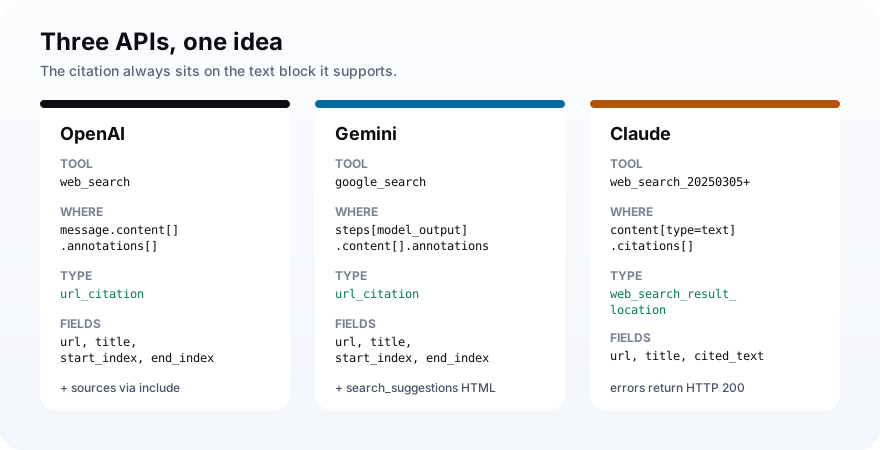
| Engine | Tool | Citation type | Span info |
|---|---|---|---|
| OpenAI | web_search | url_citation | start_index, end_index |
| Gemini | google_search | url_citation | start_index, end_index |
| Claude | web_search_20250305 or later | web_search_result_location | cited_text (up to 150 chars) |
How much does the OpenAI web search API cost?
OpenAI charges $10 per 1,000 web search calls plus the retrieved search content at the model's token rate. The older web_search_preview tool on non-reasoning models costs $25 per 1,000 calls with free search content. Claude charges $10 per 1,000 searches plus tokens, and Gemini 3 models charge $14 per 1,000 search queries after the first 5,000 each month.
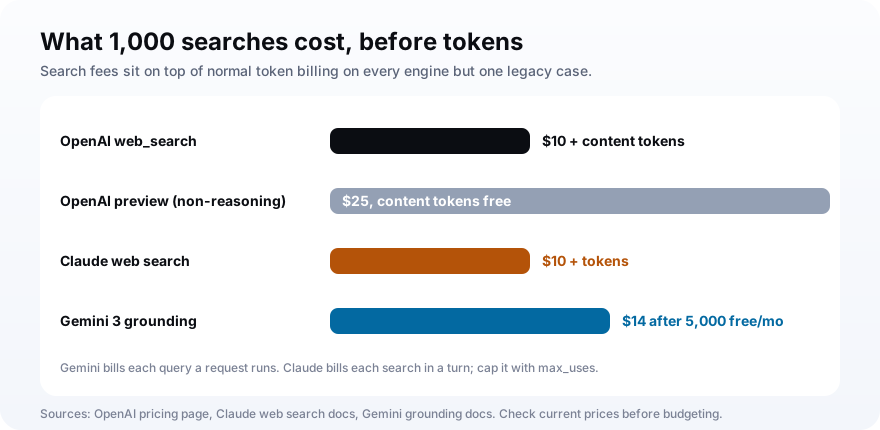
The OpenAI figures come from its pricing page, and the Gemini figures from Google's grounding docs. Prices move, so check both before you budget.
Count calls, not prompts. A single Gemini request can run several queries, each billed separately, and Claude bills every search a turn performs, so cap them with max_uses.
Small models have their own rule. OpenAI bills search content on gpt-4o-mini and gpt-4.1-mini as a fixed 8,000 input tokens per call, which makes their per-search cost easy to predict.
How to check whether your domain gets cited
Pass the citations list to a small function that tests whether your domain appears in any cited URL, and run the same check on the consulted sources. Log both for every prompt you care about. Cited means the model leaned on your page for a claim; consulted but not cited means it found you and preferred another source, which points to the page you should improve.
def is_cited(cited, domain="yourbrand.com"):
    return any(domain in c["url"] for c in cited)


print("cited:", is_cited(cited), "| consulted:", any("yourbrand.com" in u for u in sources))
One answer tells you little, because AI answers change from run to run. Run the same buyer prompts on a schedule and read the cited rate over weeks, as in our Python tracker tutorial.
And remember where the value goes. When Google shows an AI summary, users click a source inside it on only 1% of visits, according to Pew Research Center. The citation is the visibility, even when nobody clicks.
Mistakes that lose citations in your code
Most citation bugs live in the parser. The data is in the response, and the code reads the wrong field or the wrong moment. These are the ones I would check first in any integration, including the ones above.
- Storing output_text and discarding the annotations that hold the links.
- Slicing output_text with start_index and end_index instead of the content part's own text.
- Leaving search optional, then reading a run that never searched as a zero.
- Asking for a JSON schema response and getting the answer without its annotations.
- Storing text with leaked private-use citation markers still inside it.
- Treating Claude's HTTP 200 as success without checking the search result for an error object.
- Comparing a single answer instead of a cited rate across repeated runs.
Frequently asked questions
Does the OpenAI web search API return sources?
Why are the url_citation annotations empty?
How much does the OpenAI web search API cost?
What is the difference between citations and sources in the OpenAI API?
How do I get citations from Gemini and Claude APIs?
Is the OpenAI API web search answer the same as ChatGPT search?
Read the annotations first, then the text
To get citations from the OpenAI web search API, start with three changes: force the search with tool_choice, request web_search_call.action.sources, and parse url_citation annotations before you touch output_text. Add the clean_text step, then reuse the same structure for Gemini and Claude so all three engines land in one table.
If you need that table across every engine without maintaining three parsers, an AI-visibility API like MentionsAPI returns the citations already normalized.