Nearly every guide tells you to block Amazonbot. Nearly every guide is treating three bots as one.
Amazonbot looks like a simple allow-or-block question, and it is not. Amazon runs three crawlers under closely related names, controls each one separately, and split them on purpose. Miss that, and a single blunt robots.txt rule can quietly cut you out of Amazon's fastest-growing shopping surface.
This guide covers what Amazonbot is, how the three bots differ, whether they respect robots.txt, the config most brands actually want, and why one of the three is worth protecting even if you block the others.
The stakes are the same ones reshaping search everywhere. Pew Research Center found that users click a result just 8% of the time when an AI summary appears, versus 15% without. As answers replace links, being inside the answer is the visibility that is left, and Amazon is where that answer can end in a purchase.
What is Amazonbot?
Amazonbot is Amazon's web crawler, and by Amazon's own description it fetches pages to improve its products and services and may use them to train Amazon AI models. It identifies itself in its user agent, publishes its IP ranges, and honors robots.txt. In short, it is the training-facing member of Amazon's crawler family.
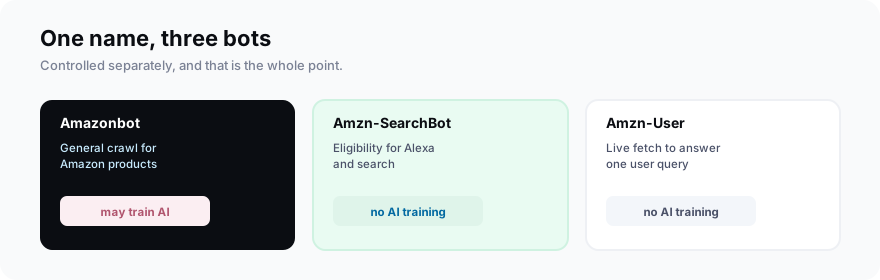
The important word in Amazon's description is "may." Amazonbot is where the AI training risk lives, which is exactly why some publishers want it out. But blocking it, on its own, does nothing to your presence in Amazon's search and shopping tools, because those run on a different bot entirely.
You can verify it is really Amazon, too. Amazonbot names itself in its user agent and Amazon publishes its IP ranges, so a request claiming to be Amazonbot can be checked against that list, the same way you verify Googlebot. That matters because bad actors sometimes borrow a trusted crawler's name to slip past filters.
Amazonbot vs Amzn-SearchBot vs Amzn-User
The three bots do different jobs and are controlled independently, which is the fact that changes your decision. Amazonbot may train AI, Amzn-SearchBot feeds search experiences like Alexa without training, and Amzn-User fetches a single page live to answer a specific request. Blocking one does nothing to the others.
| Bot | What it does | Trains AI? |
|---|---|---|
| Amazonbot | General crawl for Amazon products | May train |
| Amzn-SearchBot | Eligibility for Alexa and search | No |
| Amzn-User | Live fetch to answer one query | No |
Amazon spells this out plainly on its official Amazonbot page: allowing Amzn-SearchBot does not make your content eligible for AI training, and blocking Amazonbot does not remove you from search. The two questions, training and search, are decoupled.
Amzn-User is the odd one out. It is not a bulk crawler at all; it fetches a single page live when a person asks Alexa something that needs current information, like today's store hours. Because a human triggered it, Amazon warns it may not honor every robots.txt rule, though it only grabs the one page the question needs.
That decoupling is recent and deliberate. For a long time an AI-training opt-out and a search-visibility opt-out were the same lever, so blocking meant losing both. Splitting the bots handed site owners a real switch: keep the commerce upside, drop the training you did not agree to.
Does Amazonbot respect robots.txt?
Yes. Amazon states that all three crawlers respect the robots exclusion protocol and honor user-agent and disallow directives, along with nofollow links and noindex and noarchive tags. That puts Amazonbot with the well-behaved crawlers like GPTBot, not with the ones that ignore the file. A disallow rule here is a real off switch.
Two caveats matter. Amazon supports no Crawl-delay directive, so you cannot slow these bots down, only allow or disallow them. And Amzn-User, because it acts on a live user request rather than a bulk crawl, may not follow every robots.txt rule, though it only fetches one page per query.
The other practical note is timing. Changes can take up to 30 days to take effect because of caching, so set your policy once and give it time rather than flipping rules and expecting an overnight result.
Should you allow or block Amazonbot?
For most brands, block Amazonbot and allow Amzn-SearchBot. That opts you out of feeding Amazon's AI training while keeping your content eligible for Alexa and Amazon's shopping assistant. It is the rare configuration that gives you the privacy stance and the commerce visibility at once, with no real cost.
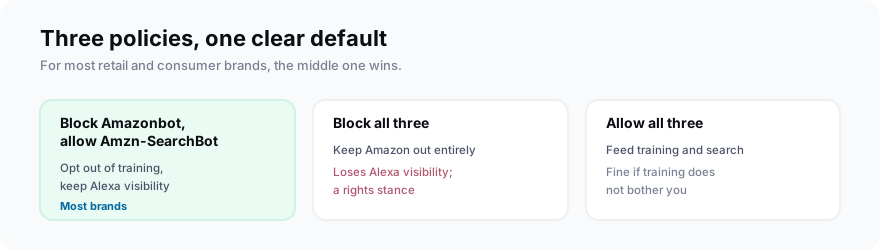
Block all three only if you have a firm reason to keep Amazon out entirely, such as a licensing position or a policy against any Amazon use of your content. Be honest about the cost: for a retail or consumer brand, that also means giving up visibility in a shopping surface used by hundreds of millions of people.
Allowing everything is a perfectly reasonable default if training does not bother you. Plenty of brands want maximum reach and see Amazon learning from their content as fair rent for being everywhere Amazon shows up. The only real mistake is choosing by accident with one blunt rule.
Whichever way you lean, it is a decision about whether you want Amazon's models trained on you, which is a rights call more than a traffic one, the same as it is with Applebot-Extended. The difference is that Amazon attaches a commerce reward to getting the search half right.
Why Amzn-SearchBot matters: Alexa and Amazon's shopping AI
Amzn-SearchBot is the bot worth protecting, because it is your ticket into Amazon's AI shopping experiences. That surface is not small: Amazon's generative shopping assistant, launched as Rufus, reached hundreds of millions of shoppers before being folded into a broader assistant. Being eligible to appear there is a real distribution channel.
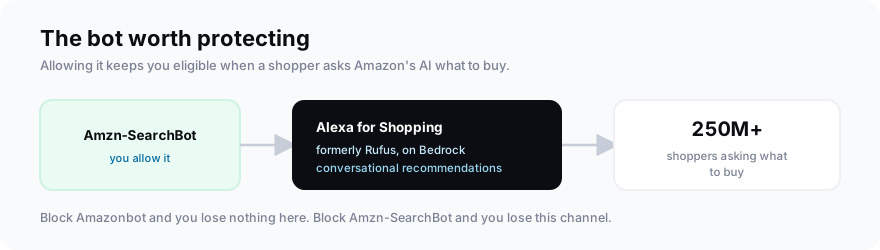
Amazon's assistant answers questions like "what is a good gift for a five-year-old who loves dinosaurs" with conversational recommendations drawn from its catalog and the wider web. Rufus grew to more than 250 million users with interactions up over 200% year over year before its 2026 rebrand into Alexa for Shopping.
The way it works is why appearing is valuable. A shopper asks in plain language, and the assistant replies with specific products and reasons, pulling from Amazon's catalog and, increasingly, the wider web. If your brand is eligible and relevant, you can be one of those named recommendations at the exact moment of a buying decision.
The surface is also consolidating upward. In May 2026 Amazon folded Rufus into Alexa for Shopping, combining it with Alexa+ so the whole assistant strategy points at one place. Whatever the name this quarter, Amzn-SearchBot is the crawler that keeps you eligible for it.
This is sharpest for retail, DTC, and any brand whose buyers research on Amazon. If a shopper asking the assistant for the best option in your category could plausibly land on your product, Amzn-SearchBot eligibility is not optional; it is table stakes for that channel.
For a commerce brand, that changes the calculus completely. Blocking a training crawler costs you nothing you can measure, but blocking the search bot costs you a seat at the table when a quarter of a billion people ask an AI what to buy. Keep Amzn-SearchBot on unless you have a strong reason not to.
Amazonbot is a rights decision. Amzn-SearchBot is a revenue decision. Do not answer them with the same robots.txt line.The one-line rule
How do you block Amazonbot but keep search?
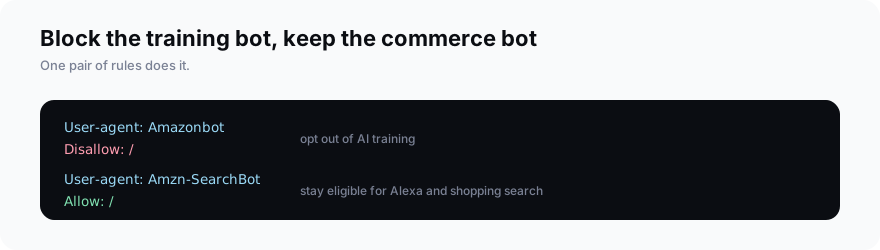
You do it with two blocks in robots.txt: a disallow rule for Amazonbot and an allow rule for Amzn-SearchBot. Because Amazon treats the three crawlers as separate user agents, that pair opts you out of AI training while keeping you eligible for Alexa and shopping search. It is the whole configuration, in four lines.
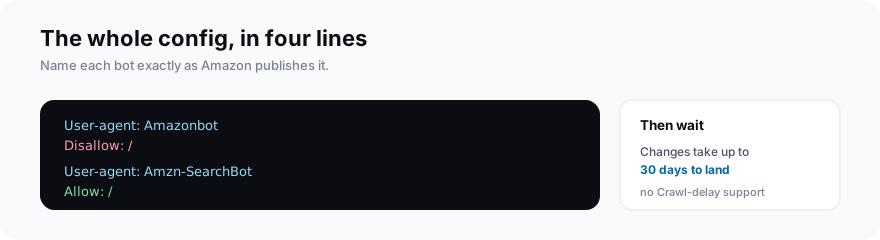
Name each user agent exactly as Amazon publishes it, since the rules match on the bot name. Add a User-agent line for Amazonbot with a Disallow set to a single slash, then a User-agent line for Amzn-SearchBot with an Allow set to a single slash. Leave Amzn-User alone, because you cannot fully gate a user-triggered fetch anyway.
Order and exact spelling are what trip people up. Give each bot its own User-agent block rather than lumping them together, and spell the names exactly as Amazon lists them. A missing or misspelled name simply means the rule never applies, and a rule that does not match is the same as no rule at all.
Then verify it took. After the change propagates, check your server logs or CDN analytics for the Amazonbot, Amzn-SearchBot, and Amzn-User user agents, and confirm Amazonbot is being turned away while Amzn-SearchBot still gets through. Since these bots honor the file, a correct rule holds without any firewall work.
One thing not to do is block by IP address. Amazon rotates its ranges and publishes them for verification, not as a blocklist, so the user-agent rule is both simpler and the method Amazon actually supports. Reach for a firewall only when a crawler ignores robots.txt, which these do not.
How is Amazonbot different from GPTBot and Bytespider?
Amazonbot is a compliant, commerce-linked crawler with a split-control design that most AI bots lack. GPTBot is a well-behaved training crawler you can cleanly block, Bytespider is a training crawler that ignores robots.txt, and Applebot-Extended is a switch rather than a crawler. Amazonbot is the only one that ties directly to a shopping channel worth keeping.
| Crawler | Honors robots.txt? | What blocking costs you |
|---|---|---|
| Amazonbot | Yes | Nothing (search is a separate bot) |
| GPTBot | Yes | Being in ChatGPT training |
| Bytespider | No | Little; needs a firewall to stop |
| Applebot-Extended | Yes (a switch) | Apple AI training only |
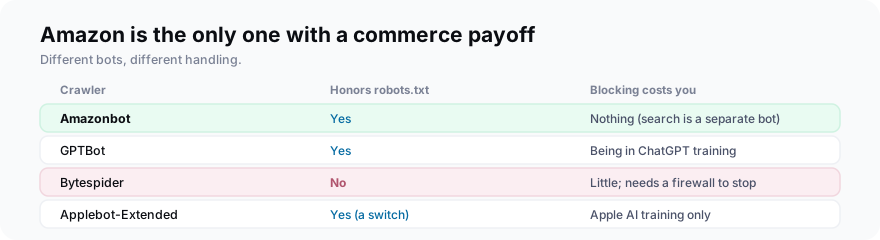
So the right instinct is per bot, not per company. You might block one Amazon crawler and allow another, block Bytespider at the firewall, and let Applebot-Extended through, all on the same site. Treating every crawler as one yes-or-no decision is how brands accidentally opt out of channels they wanted.
The lesson across all of them is that AI crawlers are not one policy. We walk through the crawler that ignores the rules in our Bytespider guide and the training switch in our GPTBot guide, and Amazon is the case where the payoff for getting it right is a shopping channel, not just principle.
Frequently asked questions
What is Amazonbot?
What is the difference between Amazonbot, Amzn-SearchBot, and Amzn-User?
Does Amazonbot respect robots.txt?
Should you block Amazonbot?
Will blocking Amazonbot remove me from Alexa or Amazon's AI answers?
How do you block Amazonbot but keep search visibility?
Block the training bot, keep the shopping bot
Do this next: add a robots.txt rule that disallows Amazonbot and allows Amzn-SearchBot, using the exact bot names Amazon publishes. That opts you out of AI training while keeping your content eligible for Alexa and Amazon's shopping AI, and it takes effect within about a month.
One habit worth keeping: revisit it. Amazon renamed its shopping assistant once already this year, and the bot names could shift as the product does. A quick look at Amazon's crawler page a couple of times a year keeps your robots.txt aligned with whatever the current split is.
Then think about the other side of the coin. Controlling what Amazon crawls is half the job; knowing whether the AI shopping assistants actually recommend you is the other half. Track where you show up across the engines with your AI visibility fundamentals in view, the same way you would for any AI answer.