Most advice about GPTBot is stuck in 2023.
Back then GPTBot was OpenAI's only crawler, and blocking it was a clean way to keep your content out of ChatGPT. That is no longer true. GPTBot is the training crawler, and blocking it in robots.txt opts your content out of model training and nothing else. It does not remove you from ChatGPT search, which runs through a separate crawler called OAI-SearchBot. So the real question is not block or allow. It is which of OpenAI's four crawlers to allow, and for what.
What is GPTBot?
GPTBot is OpenAI's web crawler for collecting public content to train its models, introduced in August 2023. It fetches pages the way a search crawler does, then adds them to the data that future GPT versions learn from. GPTBot respects robots.txt, so you can allow or block it. It is one of four separate OpenAI crawlers, each with a different job.
That last part trips people up. When someone says "block the ChatGPT bot," they usually mean GPTBot. But GPTBot is only the training bot.
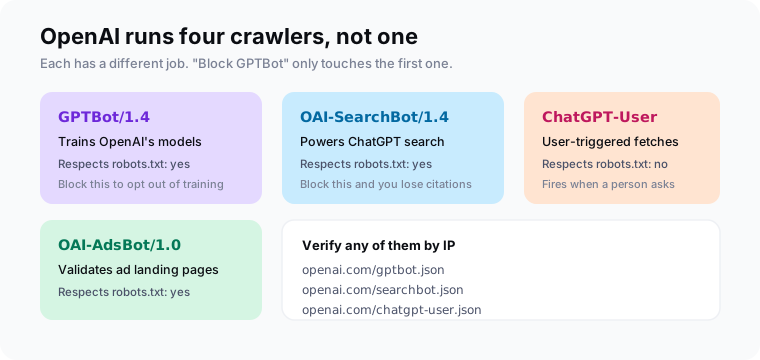
Per OpenAI's crawler docs, the current agents are GPTBot/1.4 for training, OAI-SearchBot/1.4 for ChatGPT search, ChatGPT-User for fetches a person triggers, and OAI-AdsBot for checking ad landing pages.
Should you block GPTBot or allow it?
Allow GPTBot if you want your content to help train OpenAI's models. Block it if you would rather your work stay out of the training set. For most brands the honest answer sits in the middle: block GPTBot but allow OAI-SearchBot, so you keep ChatGPT visibility while opting out of training. The choice comes down to what you are trying to protect.
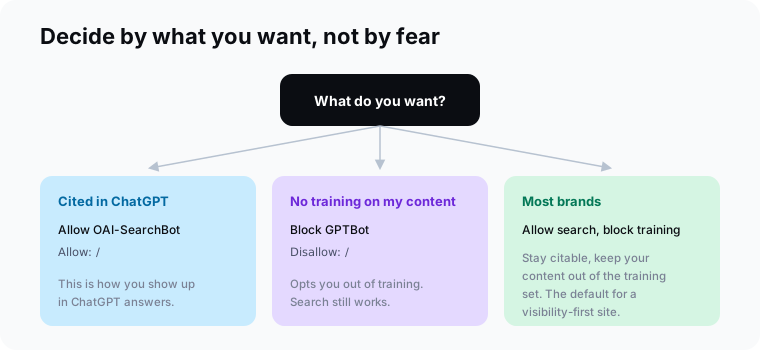
Here is how I think about it.
If you sell content, like a news site or a research publisher, blocking training makes sense. Your archive is the product, and you do not want to hand it over for free.
If you sell a product or a service and you want AI to recommend you, blocking everything is a mistake. You want to be in the answers. That means allowing the search bot no matter what you decide about training.
Does blocking GPTBot hurt your ChatGPT visibility?
No. Blocking GPTBot opts you out of model training only. ChatGPT search visibility runs through a different crawler, OAI-SearchBot, and OpenAI documents the two controls as independent. You can disallow GPTBot and still allow OAI-SearchBot, which means ChatGPT can find, read, and cite your pages in its answers. The bots share a name but not a job.
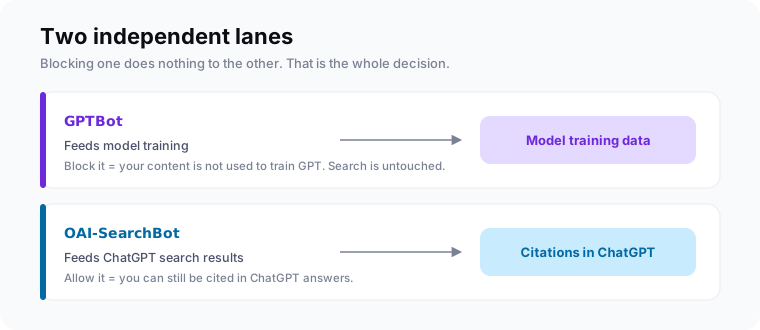
This is the single most common GPTBot mistake I see. A team reads a scary headline, drops Disallow: / on GPTBot, and assumes they have protected themselves. Instead they have opted out of training, which barely moves the needle, and if they blocked OAI-SearchBot too, they quietly deleted themselves from ChatGPT answers.
Blocking GPTBot is a training decision. Staying in ChatGPT is a search decision. They are two different switches, and most people only flip one by accident.The core insight
GPTBot vs OAI-SearchBot vs ChatGPT-User: what is the difference?
GPTBot trains models. OAI-SearchBot powers ChatGPT search and citations. ChatGPT-User fetches a page when a person asks ChatGPT about it. GPTBot and OAI-SearchBot obey robots.txt; ChatGPT-User does not, because a user triggered the request. A fourth bot, OAI-AdsBot, checks ad landing pages. Treat them as four switches, not one.
| GPTBot | OAI-SearchBot | ChatGPT-User | |
|---|---|---|---|
| Job | Trains models | Powers ChatGPT search | User-triggered fetch |
| Respects robots.txt | Yes | Yes | No |
| Block to | Opt out of training | Leave ChatGPT search | Rarely worth blocking |
| Affects citations | No | Yes | Indirectly |
ChatGPT-User is the odd one. Because a real person asked for the page, OpenAI treats the fetch like a browser visit, so robots.txt rules may not apply. You cannot cleanly block it with robots.txt. If you must stop it, do it at the firewall by IP.
How do you block or allow GPTBot in robots.txt?
Add a block at yourdomain.com/robots.txt that names each OpenAI user-agent. To keep ChatGPT visibility while opting out of training, allow OAI-SearchBot and disallow GPTBot. Save the file at your domain root. OpenAI says changes take about 24 hours to register, and the agent name is case-sensitive, so match GPTBot exactly.
Here is the config I run and recommend for most brands:
# Stay citable in ChatGPT
User-agent: OAI-SearchBot
Allow: /

# Opt out of model training
User-agent: GPTBot
Disallow: /

# Let ad landing pages validate
User-agent: OAI-AdsBot
Allow: /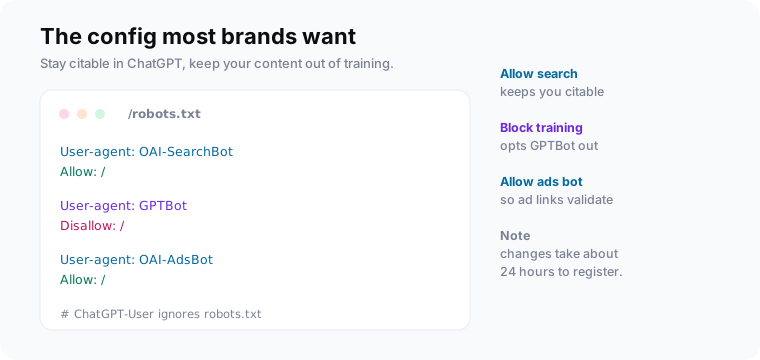
Want the opposite? To block everything from OpenAI, add Disallow: / under GPTBot, OAI-SearchBot, and OAI-AdsBot. Just know that the second line is what costs you ChatGPT citations, not the first.
How do you verify GPTBot is really GPTBot?
Match the request IP against OpenAI's published list at openai.com/gptbot.json, rather than trusting the user-agent string, which anyone can fake. OpenAI publishes a separate JSON file of IP ranges for each crawler and keeps them updated. If a request claims to be GPTBot but its IP is not on that list, it is a spoof, and you can block it at the firewall.
This matters because scrapers love to wear GPTBot's name. Setting a friendly robots.txt rule for GPTBot does nothing to stop a scraper that just copies the string. IP verification is the only rule that holds.
Who is blocking GPTBot, and should you copy them?
GPTBot is the most-blocked AI crawler on the web: 5.89% of about 140 million sites disallow it, per an Ahrefs study published in 2025. Among the top 1,000 sites the rate is near 25%, led by publishers like The New York Times. Copy them only if your business model is selling content. For most brands, blocking training but keeping search is the smarter call.
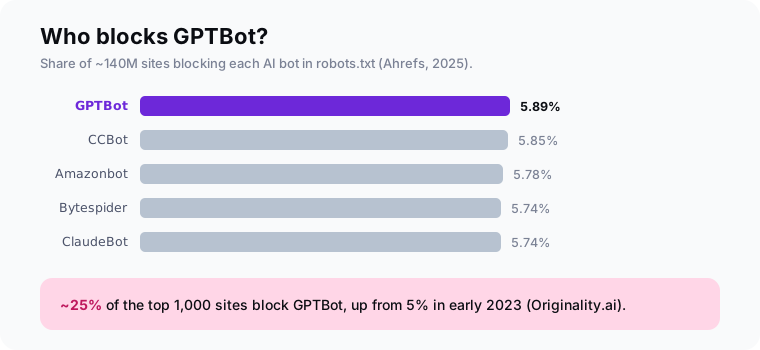
The publishers blocking GPTBot are protecting a paywall. If you are a SaaS tool, an agency, or a store, you want the opposite outcome. You want ChatGPT to name you when someone asks for options. Blocking the search bot to make a point about training data is a fast way to vanish from those answers. The deeper playbook lives in our AI search optimization guide.
Frequently asked questions
What is GPTBot?
Should I block GPTBot?
Does blocking GPTBot remove me from ChatGPT?
How do I block GPTBot in robots.txt?
What is the difference between GPTBot and OAI-SearchBot?
How do I verify a request is really GPTBot?
Set the config, then measure the result
Do this today: allow OAI-SearchBot, block GPTBot if you want out of training, and verify bots by IP. That gets your crawler policy right in about ten minutes.
Then check the part that pays the bills. robots.txt controls whether AI can reach you; citations are whether it actually does. Pull that baseline with MentionsAPI, keep your llms.txt tidy, and watch whether allowing the search bot turns into real mentions in ChatGPT.