PerplexityBot is the one AI crawler where blocking actually costs you something.
That flips the usual advice on its head. GPTBot, ClaudeBot, and Google-Extended are training controls, so blocking them opts you out of AI training and leaves your visibility untouched. PerplexityBot is not a training crawler. It indexes pages so Perplexity can cite them in answers, which means blocking it removes you from Perplexity results. And two quirks make the decision messier than a single robots.txt line.
What is PerplexityBot?
PerplexityBot is Perplexity's web crawler that indexes pages so they can be surfaced and linked in Perplexity answers. Per Perplexity's own documentation, it is "designed to surface and link websites in search results on Perplexity" and is "not used to crawl content for AI foundation models." It respects robots.txt, and Perplexity publishes its IP ranges so you can tell a real request from a spoof.
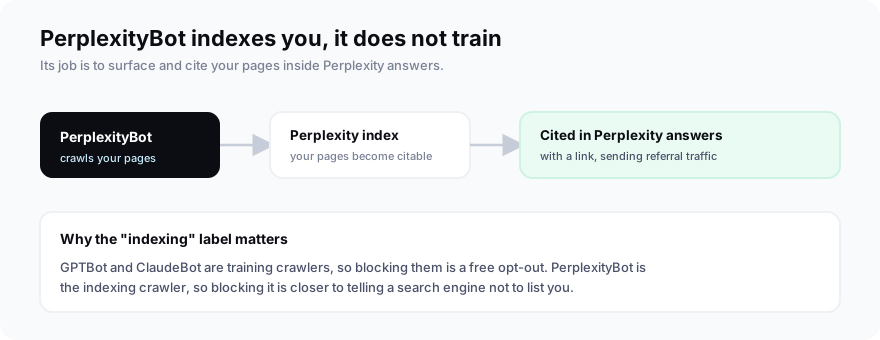
Hold onto that distinction. When people block GPTBot, they are opting out of training with no downside to visibility. Blocking PerplexityBot is not that. It is closer to telling a search engine not to index you.
Perplexity runs it at scale, too. Cloudflare measured the declared crawler at 20 to 25 million requests a day across the web, a sign of how actively Perplexity indexes. That volume is good news if you want to be found, and a reason to be deliberate if you do not.
Perplexity's two crawlers
Perplexity runs two agents with very different rules. PerplexityBot indexes the web and respects robots.txt. Perplexity-User fetches a single page when a user asks a question that needs it, and generally ignores robots.txt, because the request came from a person, not a crawl. So your robots.txt controls one of the two, not both.
| PerplexityBot | Perplexity-User | |
|---|---|---|
| Job | Indexes pages for Perplexity | Fetches a page for a user |
| Respects robots.txt | Yes | No, generally ignores it |
| Block affects | Your Perplexity visibility | User-triggered fetches only |
| Stop it with | robots.txt (mostly) | IP or firewall blocking |
The split is the whole reason this decision is fiddly. A Disallow for PerplexityBot is honored, but a Disallow for Perplexity-User is not, because Perplexity treats a user-initiated fetch as the person's action rather than a crawl. So robots.txt gives you one clean lever, PerplexityBot, and leaves the other two paths, Perplexity-User and any undeclared crawler, to be handled at the network level.
Does blocking PerplexityBot hurt your Perplexity visibility?
Yes, and that is the core difference from the training crawlers. PerplexityBot is how Perplexity finds and cites your pages, so disallowing it removes the path to being surfaced in its answers and cuts off that referral channel. It does not affect your Google rankings at all. Perplexity handled 780 million queries in May 2025, so that is a real audience to opt out of.
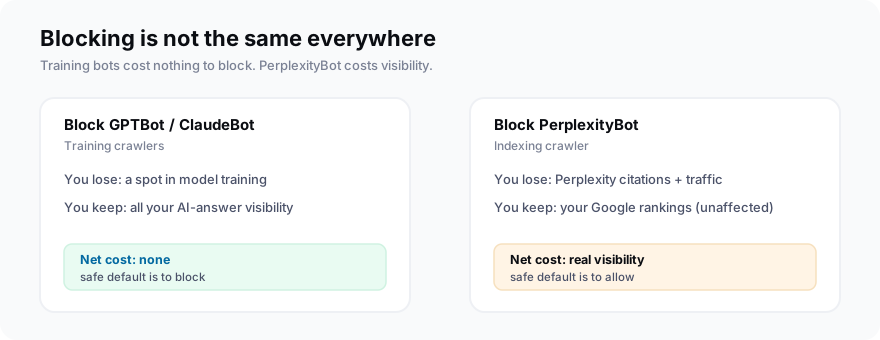
One nuance keeps it from being absolute. Perplexity says that even for a disallowed page it may still show the domain, a headline, and a brief factual summary. So a block reduces your presence rather than erasing it, which makes the trade even less appealing.
That audience also sends real referral traffic. Perplexity made up about 7.23% of global AI referral traffic in a 2026 SE Ranking study of more than 100,000 sites, behind ChatGPT and Gemini but ahead of most other engines. It reached roughly 30 million users in early 2025, on the way to an $18 billion valuation that July. Opting out of PerplexityBot is opting out of a growing channel, not a rounding error.
What that looks like in practice is simple. When someone asks Perplexity a question your page could answer, an allowed page can be one of the sources it cites, with a link a reader clicks. A blocked page cannot be that source, so the citation, and the visit, goes to a competitor who left the door open. Multiply that across a category of buyer questions and it becomes a steady referral stream you either capture or hand away.
There is also a lag. Content PerplexityBot already indexed does not vanish the moment you add a Disallow. It ages out as Perplexity re-crawls and finds the block, so for a while you may still appear in answers while losing the ability to be freshly cited. If timing matters, plan for that gap.
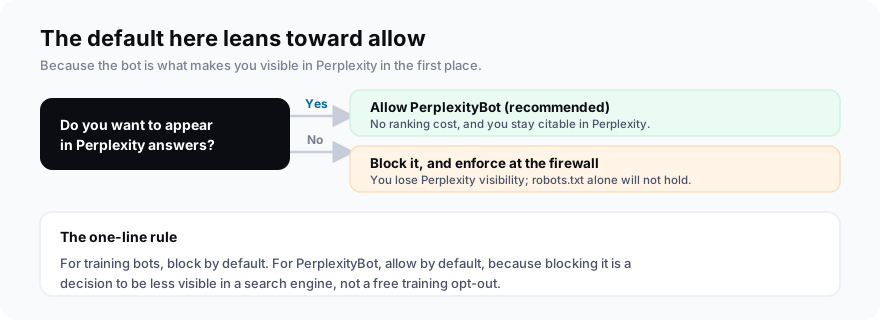
For GPTBot and ClaudeBot, blocking is a free opt-out of training. For PerplexityBot, blocking is a decision to be less visible in a search engine that answered 780 million queries in a month.The inversion
The stealth-crawler problem: will your block even hold?
Even if you decide to block, robots.txt may not enforce it. In August 2025 Cloudflare reported that Perplexity used undeclared crawlers, impersonating a normal Chrome browser and rotating IPs, to reach pages that had blocked PerplexityBot. Cloudflare measured the stealth traffic at 3 to 6 million requests a day and removed Perplexity from its verified-bots list.
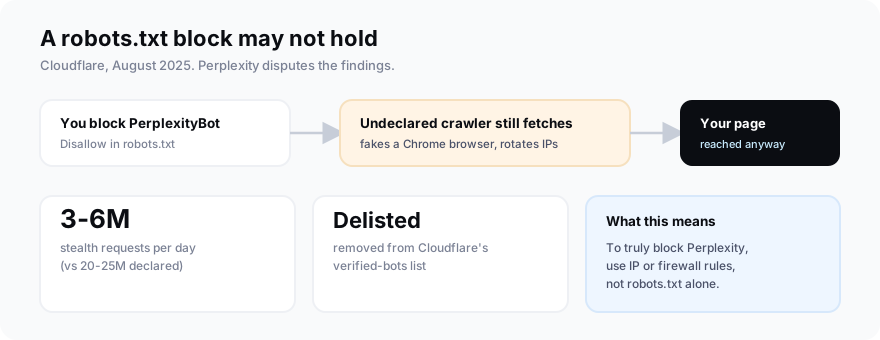
Perplexity disputed the report. Via TechCrunch, a spokesperson called the post a "sales pitch" and said the crawler named "isn't even ours." The takeaway either way is the same: if you truly need Perplexity kept out, robots.txt alone is not enough. You enforce it at the firewall.
This was not a one-time incident
No, the Cloudflare findings were not a one-off. The pattern goes back at least a year: in mid-2024, developer Robb Knight and reporting from Wired separately documented Perplexity accessing and summarizing pages that had disallowed its crawler, including paywalled articles, sometimes using a user-agent that did not match its published bot. Perplexity framed these as edge cases tied to user-initiated fetching.
Whatever the label, the through-line is consistent: Perplexity has repeatedly reached content that owners tried to keep out. If your allow-or-block decision comes down to how much you trust the robots.txt handshake, that history is the most important input, more than any single directive you write.
It cuts both ways, though. The same aggressiveness that worries publishers is why Perplexity surfaces fresh content quickly and cites a lot of it. That is exactly what you want if your goal is visibility rather than protection.
Should you allow or block PerplexityBot?
For most brands, allow it. Allowing PerplexityBot costs you nothing in Google rankings and keeps you eligible to be cited in Perplexity answers, where the referral traffic is real. Block it only if you have a firm reason to keep your content out of Perplexity, and understand you are trading away visibility, not just an AI-training slot. If you do block, plan to enforce it beyond robots.txt.
Who should actually block PerplexityBot?
Most sites should not, but a few have a real case. Publishers with paywalled or subscription content are the clearest, since Perplexity has summarized paywalled pages, and every summary is a reader who did not need to subscribe. Sites in active content-licensing talks may block to keep bargaining power at the table. And organizations under strict data-use or compliance rules may be required to keep content out of third-party AI systems entirely.
For everyone else, allowing is the better trade. If you are a brand, a SaaS company, a service business, or a publisher that lives on reach and ads, being cited in Perplexity sends qualified traffic and shapes how the engine describes your category. Blocking trades that away to protect content you were trying to distribute in the first place. Sites in active content-licensing talks are the exception that proves it, since there a block is really a negotiating stance.
The test is your business model, not a general unease about AI. If citations help you, allow. If distribution is the product you sell, consider blocking, and then enforce it properly.
How do you block, allow, and verify PerplexityBot?
To allow it, do nothing, or add an explicit allow. To block it, disallow PerplexityBot in the robots.txt at your domain root, then enforce it at the firewall, because Perplexity-User ignores robots.txt and stealth crawlers have bypassed it. Verify any request by matching its IP against Perplexity's published list rather than trusting the user-agent, which is trivial to fake.
# Stay visible in Perplexity (recommended)
User-agent: PerplexityBot
Allow: /

# Or, to opt out of Perplexity indexing:
# User-agent: PerplexityBot
# Disallow: /
#
# Note: Perplexity-User ignores robots.txt, and
# stealth crawlers have bypassed it. A real block
# needs IP/firewall rules, verified against
# perplexity.com/perplexitybot.json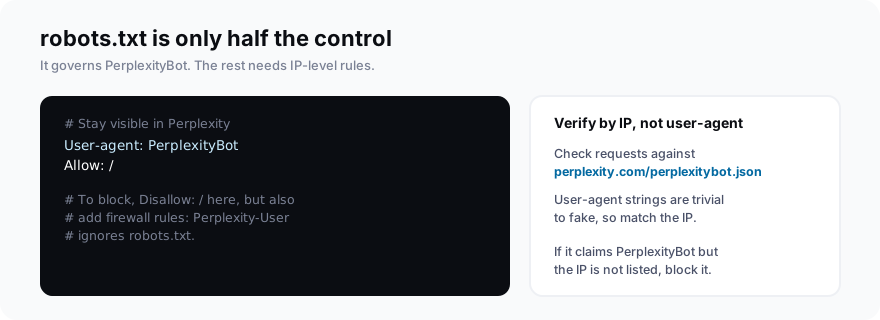
How do you enforce a block that actually holds?
Because robots.txt only reliably governs PerplexityBot, a real block lives at the network edge. Work in three layers.
First, verify by IP. Perplexity publishes its ranges as JSON at perplexity.com/perplexitybot.json and perplexity.com/perplexity-user.json. Allow only requests whose IP appears there, and treat anything claiming to be Perplexity from an unlisted IP as a spoof or an undeclared crawler.
Second, add a firewall or bot-management rule. After its August 2025 findings, Cloudflare shipped a managed rule to detect and block the undeclared Perplexity crawler, available on every plan including the free tier, and most other CDNs offer comparable bot rules. This is what stops traffic that fakes a normal browser user-agent, which robots.txt cannot see.
Third, rate-limit and challenge. For anything that slips past the first two, a rate limit or a JavaScript challenge raises the cost of automated fetching without hurting real users.
The summary is simple. robots.txt is a polite request that PerplexityBot honors. If the block has to be real, it has to live where you control the traffic, not where you hope the crawler cooperates.
It also helps to watch your logs. A spike of browser-like traffic from data-center IP ranges, right after you add a Disallow, is the exact signature Cloudflare described. If you see it, you know the robots.txt line is being ignored, and it is time for a firewall rule rather than another directive.
Common mistakes to avoid
The four mistakes that show up most are over-blocking, trusting the user-agent, assuming robots.txt is airtight, and blocking on reflex. The first is blocking Googlebot or Bingbot by accident with an overly broad rule, which quietly drops you from Google and, through Bing, from ChatGPT and Copilot. Keep AI-crawler rules specific and named.
The second is trusting the user-agent string. Anyone can send a request that says PerplexityBot, so a rule that allows by user-agent alone is trivial to bypass. Verify by IP instead.
The third is assuming a robots.txt block is airtight. As the Cloudflare findings showed, it is not, so if content genuinely must stay out, pair the directive with firewall enforcement. And the last is blocking on reflex: PerplexityBot is an indexing crawler, so a reflexive block costs you visibility you probably wanted. Decide per crawler, per goal.
Frequently asked questions
What is PerplexityBot?
Does blocking PerplexityBot hurt my traffic or SEO?
Does Perplexity respect robots.txt?
How do I block PerplexityBot?
Why is Perplexity still crawling my site after I blocked it?
What is the PerplexityBot user agent?
Allow it, then check that it worked
Do this today: unless you have a specific reason not to, allow PerplexityBot so you stay eligible for Perplexity citations, and verify any suspicious crawler by IP. If you do need to block, remember robots.txt is only half the job, and add firewall rules.
Then measure the part that matters: whether Perplexity actually cites you. Pull that baseline with MentionsAPI, keep your crawler rules deliberate across every engine, and watch whether allowing PerplexityBot turns into real mentions.
And revisit the decision as Perplexity grows. A block that made sense when it was a niche tool can cost more as it scales toward the traffic of a mainstream engine, so treat crawler access as a setting you review, not a one-time checkbox.