Blocking GPTBot does not block ChatGPT search. Allowing GPTBot does not open it. Those are two different bots.
That single confusion costs brands visibility every day. People edit robots.txt to opt out of AI, or to opt in, and touch the wrong crawler.
So here is the clean version: what each OpenAI bot does, which one decides whether ChatGPT can cite you, and the exact robots.txt to get the outcome you actually want.
What is OAI-SearchBot?
OAI-SearchBot is OpenAI's search crawler. In OpenAI's own documentation, its job is to surface websites in ChatGPT's search features. It builds and refreshes the index behind ChatGPT search, and it crawls often to keep that index fresh. It identifies itself as OAI-SearchBot and honors robots.txt.
In plain terms, this is the bot that gets you cited in ChatGPT search.
When someone runs a search inside ChatGPT and the answer links a few sources, those sources come from the index OAI-SearchBot built. If it cannot crawl you, you are not in that index, and you cannot be surfaced or cited in that answer, no matter how good your page is.
It also crawls more aggressively than the training bot, because search has to stay current.
A training crawler can visit slowly; a search index has to reflect the web as it is now. So OAI-SearchBot revisits pages to keep results fresh, which is good news if you publish often, since new and updated pages can become eligible for ChatGPT search citations quickly.
OAI-SearchBot is the bot that decides whether ChatGPT search can cite you. GPTBot is not.The one line to remember
OAI-SearchBot vs GPTBot vs ChatGPT-User: the difference that matters
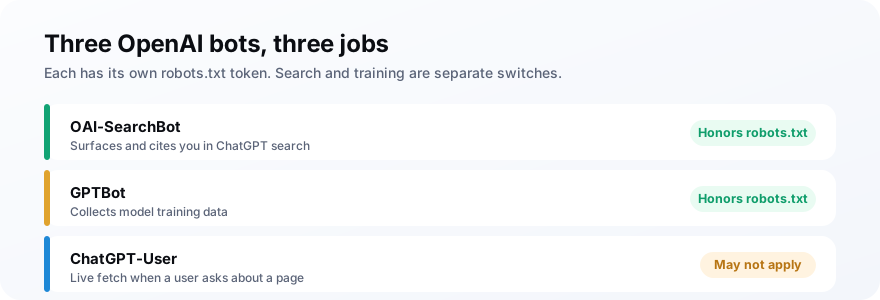
OpenAI runs three crawlers, each with its own job and its own robots.txt token. Get them straight and the whole thing stops being confusing. GPTBot trains, OAI-SearchBot powers search, and ChatGPT-User fetches live for a user question, and as crawler guides keep pointing out, they are controlled independently.
| Bot | Job | Honors robots.txt |
|---|---|---|
| OAI-SearchBot | Surfaces you in ChatGPT search | Yes |
| GPTBot | Collects model training data | Yes |
| ChatGPT-User | Live fetch for a user question | May not apply |
The deeper coverage of GPTBot itself is in our GPTBot allow-or-block guide. This piece is about the search bot that most people forget exists.
Does blocking OAI-SearchBot hurt your ChatGPT visibility?
Yes, directly. Blocking OAI-SearchBot removes you from the index behind ChatGPT search, so your pages can no longer be surfaced or cited in ChatGPT search answers. Training is unaffected, and live user fetches may still reach you, but the steady, unprompted visibility that comes from being in the search index is gone.
This is the quiet way brands disappear from ChatGPT.
They add a broad rule that blocks every AI crawler, or copy a robots.txt snippet meant to stop AI training, and OAI-SearchBot gets caught in it. Months later they wonder why ChatGPT never mentions them, without realizing they told its search crawler to stay out.
The trap is that nothing breaks visibly. Your site loads fine, Google still ranks you, and there is no error to notice.
The loss is invisible: an entire channel, ChatGPT search, quietly stops being able to cite you, and the only way to catch it is to look. That is why webmaster guides keep flagging OAI-SearchBot as the bot you least want to block by accident.
How does a page go from crawled to cited in ChatGPT search?
A citation in ChatGPT search is the last step of a short pipeline, and OAI-SearchBot sits at the very start of it. Once you see the sequence, the crawler allow stops looking optional.
First, OAI-SearchBot crawls your page, and OpenAI stores what it found in the ChatGPT search index. Nothing about your content can surface until it exists in that index.
Then a user runs a search inside ChatGPT. The model retrieves candidate pages from the index, reads the ones that match, and writes an answer that links the sources it leaned on. Those links are the citations.
Every stage after the first depends on the crawl having happened. If OAI-SearchBot was blocked, your page never entered the index, so retrieval cannot find it and the answer cannot cite it. The best page in your market loses to a weaker one that was simply allowed to be crawled.
Picture a buyer asking ChatGPT to compare tools in your category. ChatGPT searches, pulls the pages it has indexed, and names a handful in its answer. If your comparison page was crawled, it is a candidate for that shortlist; if it was not, you are absent from a conversation about exactly what you sell.
This is also why freshness matters. Because OAI-SearchBot revisits pages, an updated article can re-enter retrieval quickly, while a page it has not seen since a block stays frozen out. The crawler is not a one-time gate but the ongoing feed that keeps you eligible as the index refreshes.
None of this needs special markup or a paid program. It needs OAI-SearchBot to reach the pages you want surfaced, and those pages to answer the questions your buyers actually type. Access first, then quality, in that order.
Should you allow or block OAI-SearchBot?
Allow it in almost every case. OAI-SearchBot is what keeps you eligible to be surfaced and cited in ChatGPT search, so blocking it costs you visibility with no upside for most sites. OpenAI itself recommends allowing it if you want to appear in ChatGPT search. The only reason to block it is a firm decision to stay out of ChatGPT search entirely.
The decision splits cleanly from the training question.
You can allow OAI-SearchBot to stay visible in ChatGPT search and separately block GPTBot to opt out of training. Those two choices do not conflict, and treating them as one is exactly the mistake that drops brands out of ChatGPT answers.
There is a fair question underneath this: does allowing the search bot help your training-opt-out leak back in? It does not.
OpenAI documents the two functions as separate, so letting OAI-SearchBot index you for search does not feed your pages into model training. That separation is the whole reason the two tokens exist, and it lets a privacy-minded brand stay out of training while still being findable when someone searches for it inside ChatGPT.
How do you allow OAI-SearchBot and control the rest?
You keep OAI-SearchBot allowed, then set GPTBot to match your training stance. To stay fully visible in ChatGPT search, allow all three OpenAI tokens and change nothing else.
To opt out of training while keeping that visibility, disallow GPTBot and allow OAI-SearchBot. Leave ChatGPT-User allowed either way, so live user lookups still reach your pages, and remember that the search token is the one carrying your citations.
The order of the rules matters here. robots.txt is read top to bottom, so put the specific allow for OAI-SearchBot above any broad disallow, or a catch-all rule higher in the file can override it and quietly pull you out of the search index.
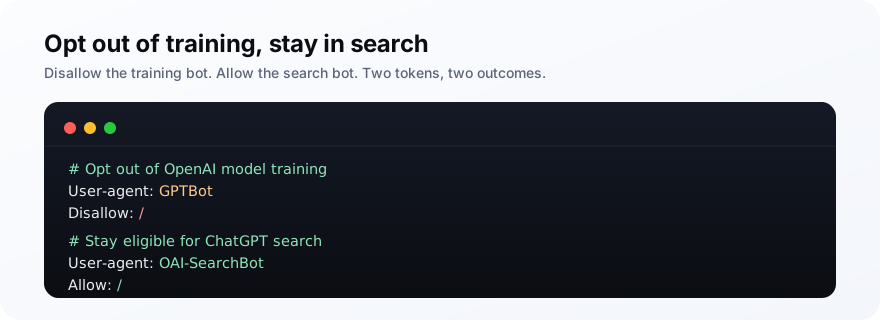
A couple of details save you from silent mistakes. Spell each token exactly, since a typo in a user-agent line does nothing at all.
And remember that a blanket rule like disallowing every bot will catch OAI-SearchBot too, so if you use broad blocks, add an explicit allow for OAI-SearchBot above them. For the full picture of controlling AI crawlers in one place, see our guide on llms.txt.
One more habit worth adopting: check your logs for the actual user-agent strings. OpenAI publishes them, so you can confirm which bot is really hitting your site.
That matters because plenty of scrapers pose as OpenAI bots to look legitimate, and because it lets you verify a real crawl rather than guessing. If you want a hard guarantee that a bot stays out, back the robots.txt rule with a firewall check against OpenAI's published ranges, the same way you would for any crawler you truly need to stop.
The mistakes people make with OpenAI's bots
Almost every OpenAI robots.txt problem comes from treating three bots as one. The confusion runs both ways, and it is easy to get wrong even with good intentions. Here are the ones that actually cost visibility.
- Blocking GPTBot and assuming ChatGPT search is now blocked. It is not; search runs on OAI-SearchBot.
- Allowing GPTBot and assuming ChatGPT search is now open. It is not; that is a separate token.
- Using a blanket disallow for all bots, which quietly catches OAI-SearchBot and drops you from ChatGPT search.
- Copying an anti-AI robots.txt snippet that lists OAI-SearchBot alongside training bots.
- Blocking ChatGPT-User and expecting it to stick, when user-initiated fetches may ignore robots.txt.
Notice that four of those five make you less visible in ChatGPT, not more protected.
The instinct to block AI crawlers is understandable, but applied bluntly it removes you from the exact search surface you probably want to be in. The fix is precision: name each token and decide it on purpose, rather than reaching for one broad rule.
How do you check whether ChatGPT actually cites you?
Allowing OAI-SearchBot makes you eligible for ChatGPT citations; it does not guarantee them. After you fix the crawler config, the real question is whether ChatGPT search actually names and links you for the queries your buyers use. That is a separate check: run those prompts through ChatGPT and record who gets cited.
Being allowed to be cited and actually being cited are not the same thing.
Confirm the config is right, then measure the outcome. Query ChatGPT with the questions your buyers ask, see whether you appear in the search answers, and track that over time so you know the allow rule actually turned into citations.
The gap between eligible and cited is where the actual work lives. Allowing OAI-SearchBot gets you into the index; being the page it surfaces is a content problem.
That is the same discipline behind any AI search visibility: clear, well-sourced, answer-first pages that a model wants to quote. The crawler config just makes sure that work can be seen. Get both right, the access and the content, and ChatGPT has every reason to name you.
Frequently asked questions
What is OAI-SearchBot?
Does blocking GPTBot block ChatGPT search?
Should I block or allow OAI-SearchBot?
What is the difference between OAI-SearchBot and ChatGPT-User?
Does OAI-SearchBot obey robots.txt?
How do I allow OAI-SearchBot but block training?
Do not block the bot that cites you
Do this next: open your robots.txt and confirm OAI-SearchBot is allowed. If you block AI crawlers broadly, add an explicit allow for it, and set GPTBot to match your training stance separately.
Then check that it worked. Run your buyer prompts through ChatGPT with MentionsAPI and watch whether you show up in the search answers. Being eligible is the config; being cited is the result, and only one of those is visible in a text file.